Multi-clipping path is a useful Photoshop technique for editing different parts of a product separately. It is especially helpful for e-commerce businesses that need to show the same product in different colors or variations.
For example, instead of taking separate photos of a shirt in five colors, an editor can use multiple paths to isolate the shirt’s body, sleeves, collar, buttons, and other parts. Each section can then be edited without affecting the rest of the image.
This saves time, reduces photography costs, and keeps product images consistent. That’s why multi-clipping path is commonly used for fashion, jewelry, footwear, and other e-commerce products.
In this guide, we’ll explain how multi-clipping path works, its key benefits, and why it can be valuable for product image editing.
What Is Multi-Clipping Path?
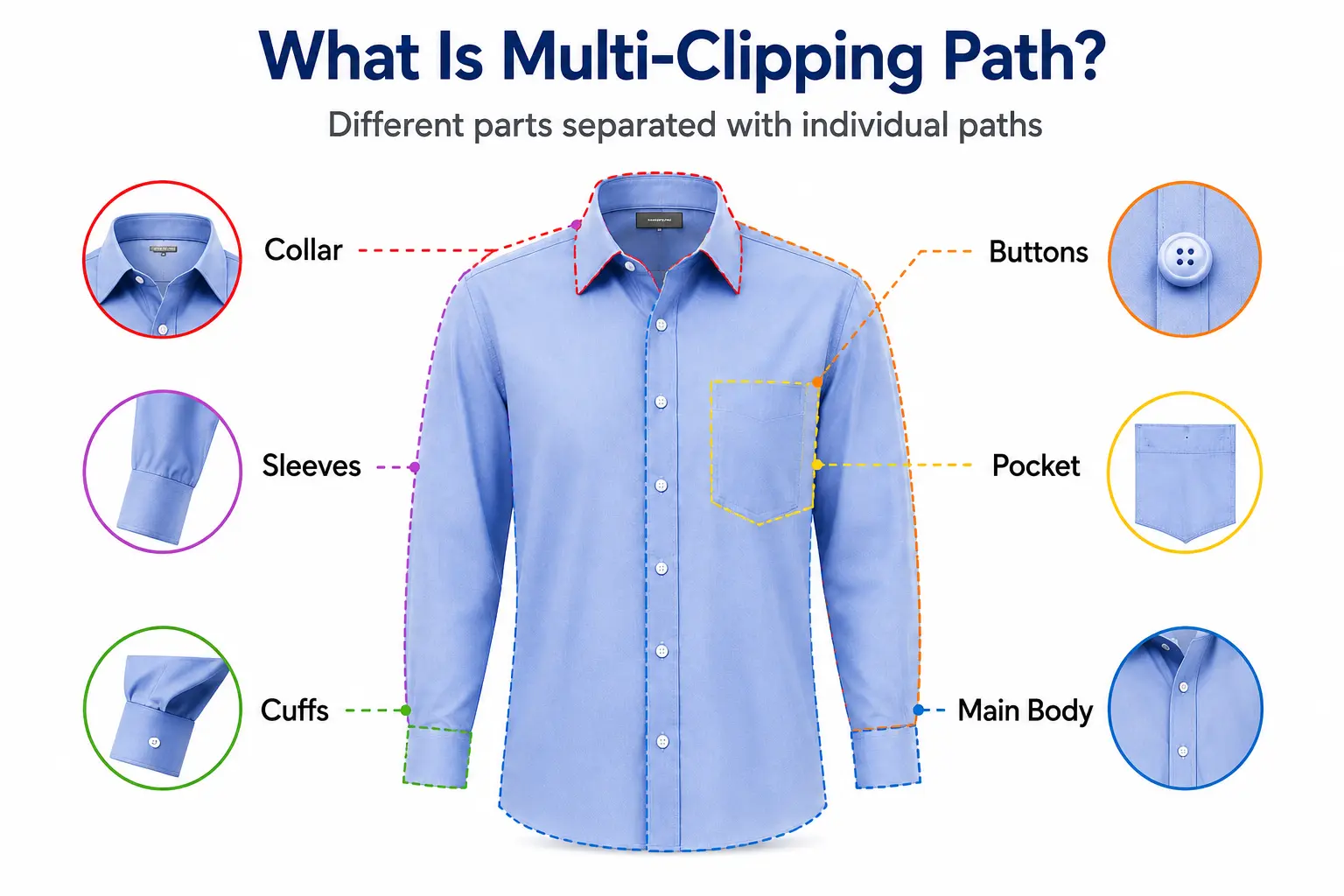
At its core, Multi-Clipping Path means creating several distinct, independent paths within a single image so that each part of that image can be controlled separately. It’s not just a background-removal tool. It’s a structured way of splitting the different components of a photo into what essentially function as individual layers.
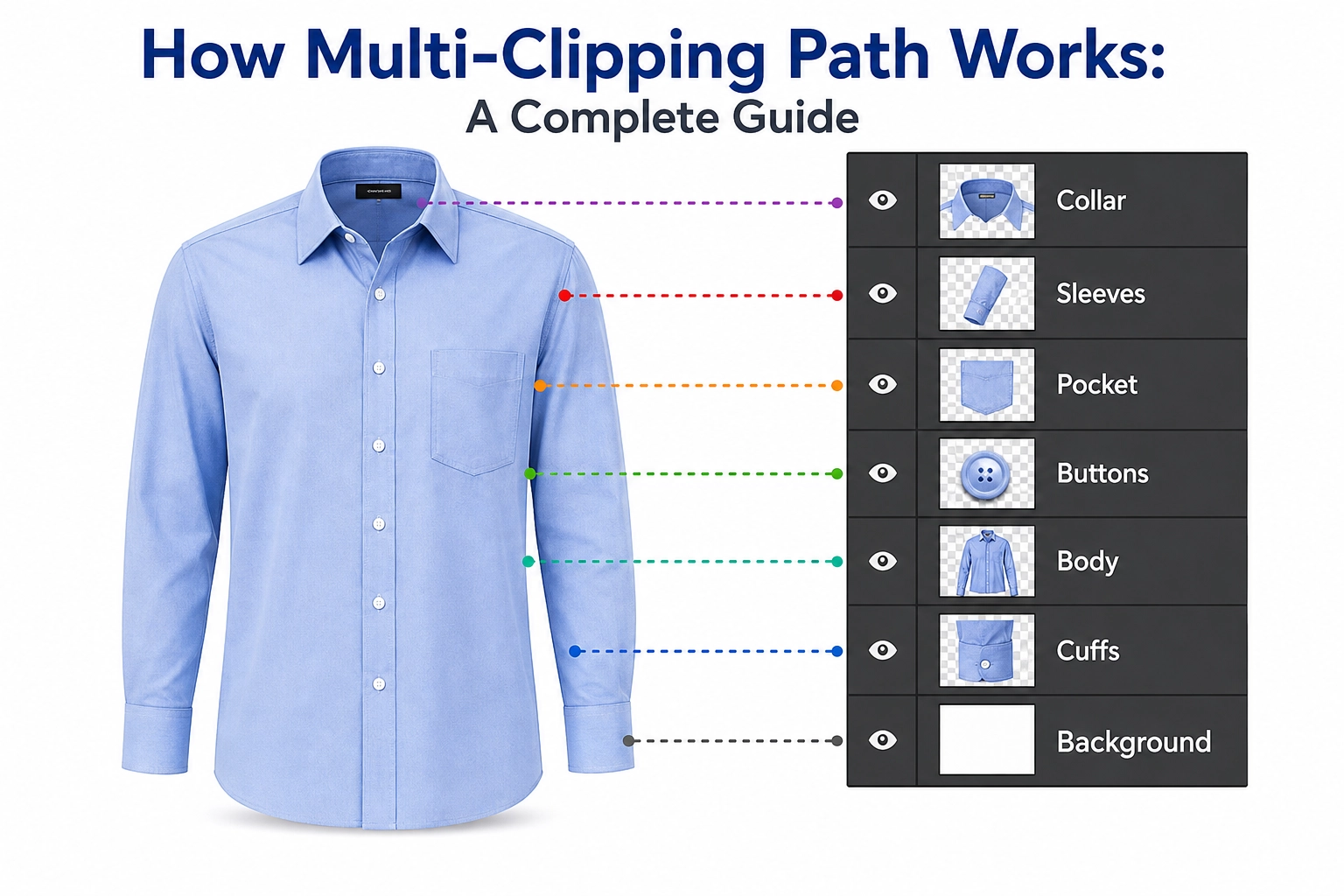
Here’s a simple way to picture it. Say you’re working with a photo of a formal shirt. That shirt has a collar, buttons, sleeves, cuffs, a pocket, and the main body six distinct parts. If you apply a Standard Clipping Path, it isolates the entire shirt from its background as one single unit. It doesn’t distinguish between the different sections inside the shirt itself. Multi-Clipping Path, on the other hand, creates a separate path for the collar, the buttons, the sleeves, the cuffs, the pocket, and the body. That means an editor can later change the color of just the shirt’s main body while leaving the collar and buttons completely untouched. Or even change just the cuffs while keeping the buttons a different color entirely.
This kind of granular control makes an image remarkably versatile, especially when a business needs to show off multiple color combinations of the same product.
Multi-Clipping Path vs. Standard Clipping Path
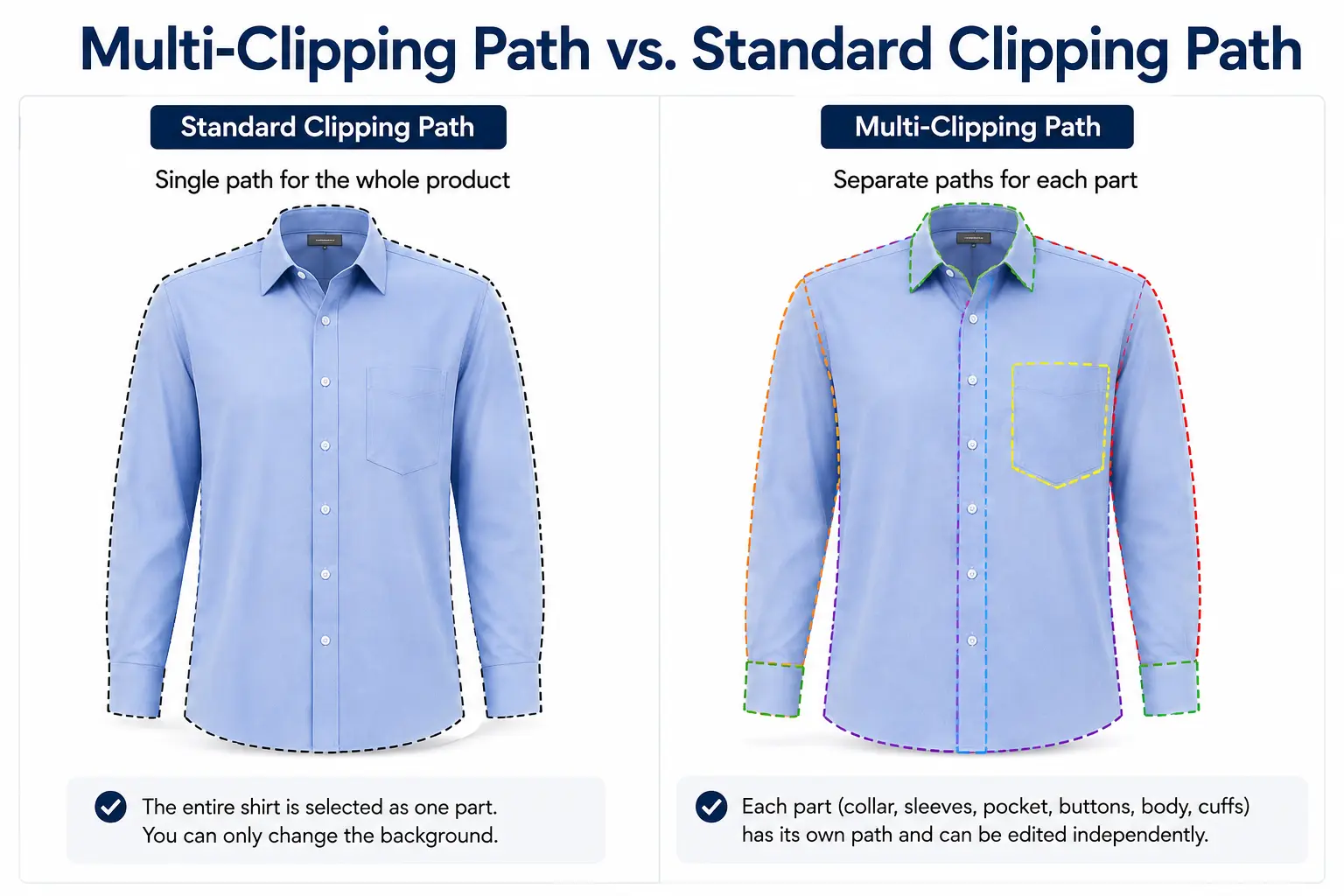
Understanding the difference between these two techniques really matters, because a lot of business owners end up ordering the wrong service simply because they don’t know the distinction.
A standard path creates just one boundary line. Everything inside that boundary counts as “selected,” and everything outside it is “deselected.” Its whole job is to separate one complete object from its background, or to remove the background entirely. This works well when the entire product needs to stay visually the same, you’re only changing what’s behind it.
Multiple paths, by contrast, means creating several such boundaries within the same image, each one editable on its own. Every part of the image essentially behaves like its own individual layer, and each of those layers can have its own color, texture, or effect applied independently.
So when does Multi-Clipping Path actually become necessary? Whenever a product comes in multiple color combinations, or whenever you need to generate several color variations from one core image, Multi-Clipping Path becomes essential. It’s especially valuable for jewelry, footwear, clothing, and any product made up of multiple components.
How Does Multi-Clipping Path Work?
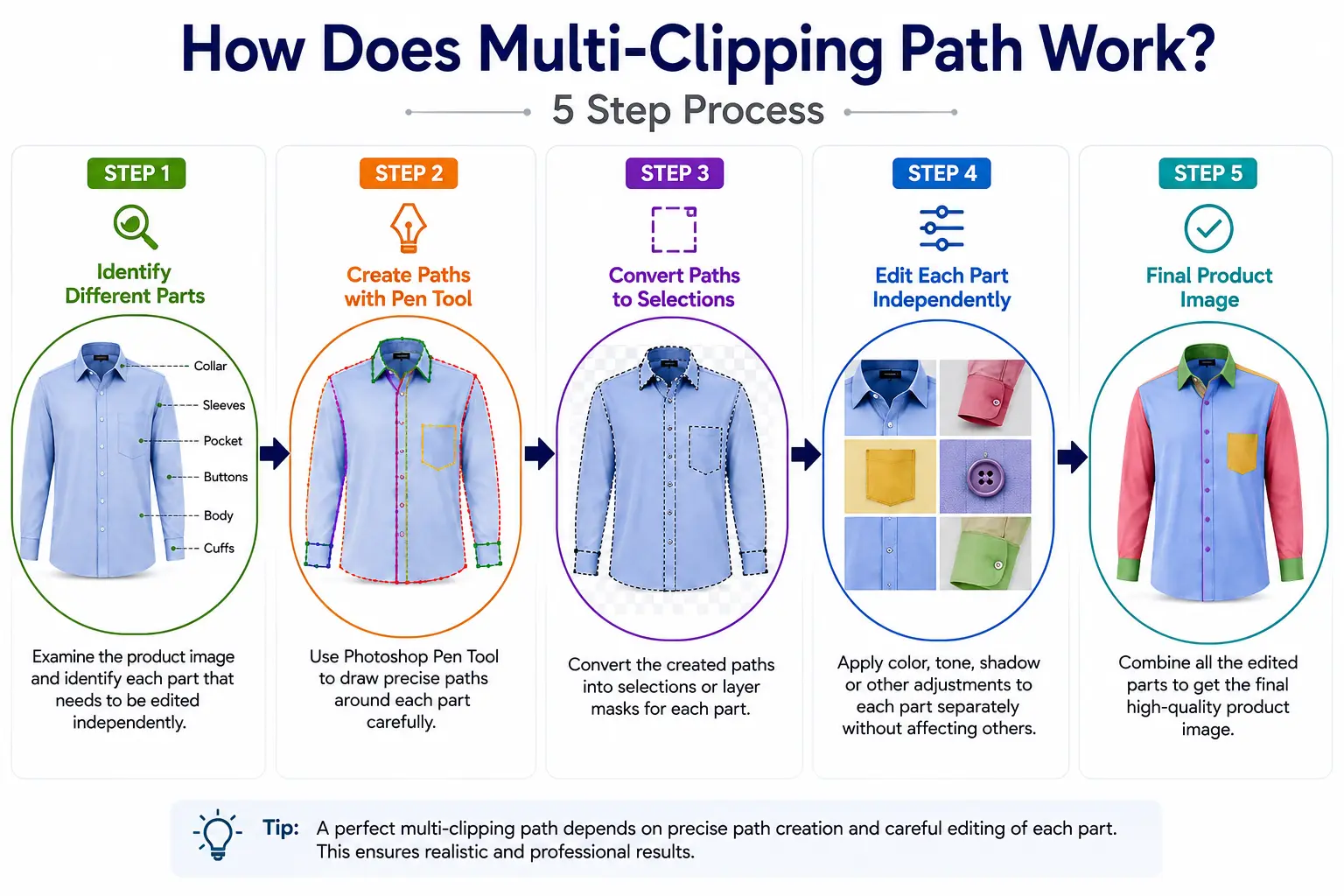
Now for the real question, how is a Multi-Clipping Path actually created? The full process typically runs through five distinct steps, from start to finish. Every one of these steps carries equal weight, skip or rush any single one, and the final result suffers for it.
Step 1 – Identify Different Objects
The very first and arguably most important step is simply studying the image closely and figuring out which parts will need their own individual path. An experienced editor examines the entire photo at this stage and identifies every section that might need to be edited on its own down the line.
For a shirt, you may need to separate the collar, sleeves, buttons, pockets, cuffs, and main body. A shoe can include the sole, laces, upper, inner lining, and logo. For jewelry, the parts may be the band, stone, clasp, and pendant. Getting this step right lays the groundwork for everything that follows. Miss a component here, or overlook something important, and it becomes much harder later on to make the specific edits a client actually needs.
Step 2 – Create Paths With the Photoshop Pen Tool
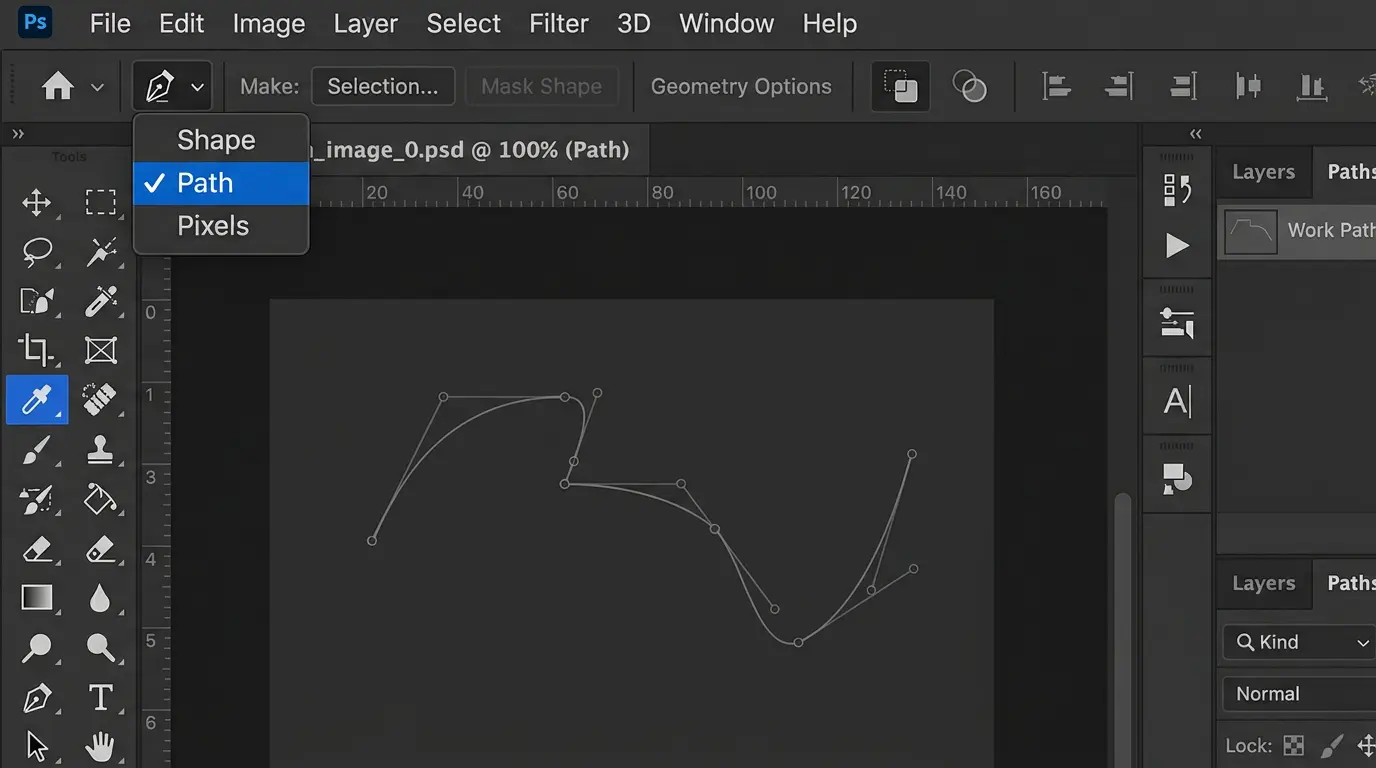
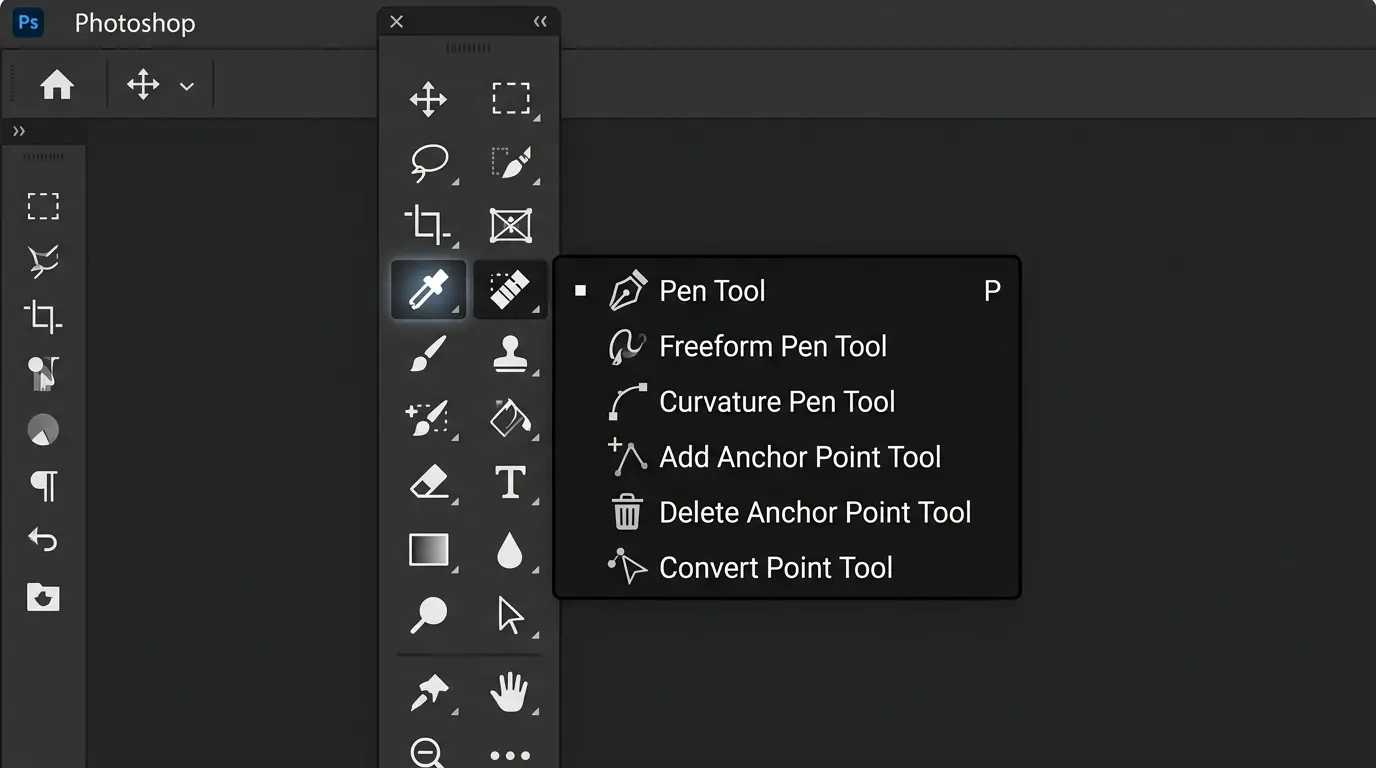
Once the different sections are identified, a skilled editor uses Photoshop’s Pen Tool to draw a precise, individual path around each one. This part of the job is entirely manual, no automated or AI-driven tool can currently match this level of precision, especially when dealing with intricate, delicate, or curved edges.
Working with the Pen Tool means carefully tracing every curve, corner, and edge with real attention to detail. The more care and time an editor puts into this stage, the more natural and realistic the final result looks. Even a small mistake, a path that drifts slightly off an edge can create an odd halo or a rough, jagged outline once color editing begins. Which can ruin the overall finish of the image. That’s why this step demands both experience and patience in equal measure.
Step 3 – Convert Paths Into Selections or Masks
Once every necessary path has been created, the next step is converting them into selections. From there, Layer Masks or Alpha Channels are used to save each part as its own distinct layer.
Photoshop’s Channels panel plays a major role here, since it’s where each path gets stored separately and can be reloaded any time it’s needed. Organizing paths this way makes it much easier to generate new color variations later, because the editor doesn’t have to redraw every path from scratch each time a new version is needed.
Step 4 – Edit Each Part Independently
This is really where the true power of Multi-Clipping Path shows itself. Since every section already exists as its own saved path and mask, an editor can now:
- Change the color of just one specific part, while leaving everything else exactly as it was
- Adjust brightness and contrast for each section individually, so every part reads clearly
- Modify texture or pattern where needed, like swapping out a fabric print
- Replace the entire background, placing the product in a completely different setting
- Fine-tune shadows or reflections so the final image still feels grounded and realistic
This level of freedom and flexibility is what truly separates Multi-Clipping Path from more basic editing methods. Being able to pull dozens of variations out of a single source image is exactly what makes this technique so valuable for e-commerce businesses.
Step 5 – Review and Export the Final Image
Finally, every finished image gets a thorough review. Editors check that edges look clean, that there’s no strange halo or rough outline anywhere, and that color transitions look natural rather than forced.
Once the image is confirmed to look fully natural and realistic, it gets exported in an e-commerce-ready format. Typically JPEG, PNG, or TIFF when higher resolution is needed. Often, the same project needs to be exported in multiple resolutions and formats too. A lighter version for the website, and a higher-resolution version for printed catalogs.
Key Benefits of Multi-Clipping Path
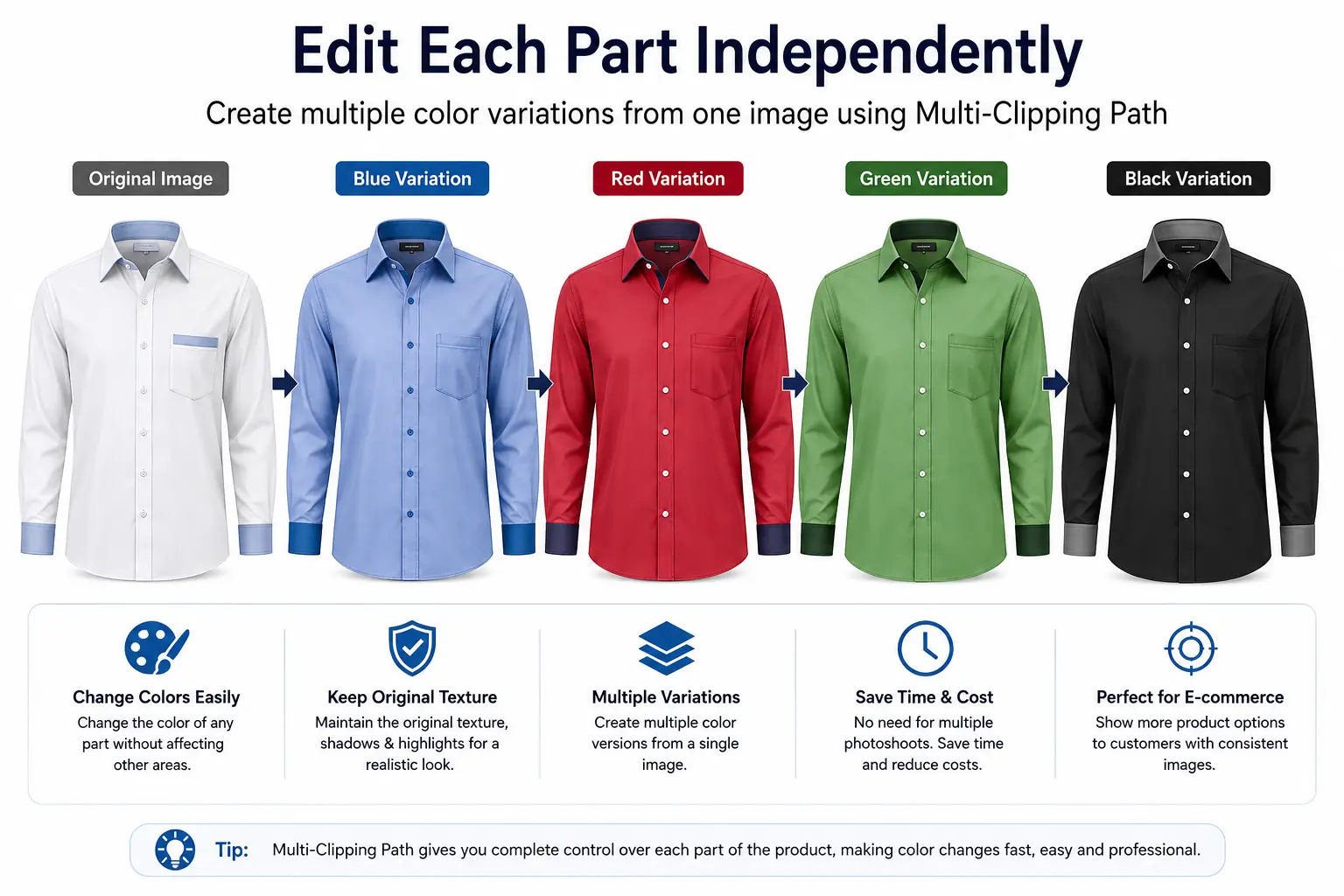
Multi-Clipping Path isn’t just a technical process. It brings real, measurable value to a business. Let’s break down each of these benefits in more detail.
Save Time and Editing Costs
Since multiple variations can come from a single high-quality photoshoot, there’s no need to keep organizing new shoots for every product update. That means real savings on studio rental, photographer fees, modeling costs, lighting setups, and props. For brands with product lines that come in many color variants, these savings add up significantly over time.
Create Multiple Product Color Variations
Showing multiple color options for a garment or product no longer requires buying separate color samples and running a new shoot for each one. Every color version can be generated from the same original image, which is a huge advantage for online stores. This also means a product doesn’t even need to be in full production yet to show all its possible color options to customers. Useful for pre-orders or market testing new colorways before committing to manufacturing.
Maintain Consistent Product Images
Because every variation comes from the same source photo, the lighting, angle, pose, and composition all stay perfectly consistent. That makes an entire product catalog look far more professional, clean, and uniform. When customers browse a site and keep seeing different lighting or angles from one product to the next, it creates a disjointed, unpolished feeling. Multi-Clipping Path removes that problem entirely.
Improve E-commerce Product Presentation
When customers see every product presented to the same standard, clean, consistent, and visually appealing. It directly influences their purchasing decisions. A well-organized, visually consistent catalog builds trust and makes a brand feel more credible. Multi-Clipping Path plays a major role in delivering that kind of consistency.
Handle Complex Products Easily
For complicated items like watches, jewelry, multi-part garments, or product sets. Multi-Clipping Path proves especially valuable, because these kinds of products typically need several sections edited independently. A watch, for example, might have a dial, strap, bezel, and buckle each potentially in a different metal or finish. And without Multi-Clipping Path, producing that kind of complex variation would be nearly impossible.
Why Is Multi-Clipping Path Important for E-commerce?
For modern e-commerce, Multi-Clipping Path has become close to essential. Let’s dig into the reasons why.
First, it makes generating product variations simple. Multiple versions of the same product can be produced without any additional photoshoot. Which speeds up product launches and gets new variants to market faster. Second, it’s used to prepare images for color swatches. Which helps customers pick their preferred color option right on the product page. A feature that’s now standard across nearly every major e-commerce site.
It also helps maintain consistency across an entire product catalog, which matters enormously for building brand identity. At the same time, being able to generate multiple product versions lets businesses expand their inventory displays and offer more variety without constantly needing new photoshoots. And in fast-moving markets like fashion and retail. Where trends shift quickly, Multi-Clipping Path lets businesses bring new collections. Color updates to market faster are a real competitive advantage.
What Types of Products Need Multi-Clipping Path?

Not every product category needs Multi-Clipping Path equally, but for certain categories, it’s almost unavoidable. Here’s a closer look at the product types where this technique gets used most.
Fashion and Clothing
The fashion industry almost always needs to show multiple color variations of the same design. For shirts, t-shirts, pants, or dresses, Multi-Clipping Path allows editors to work on the collar, sleeves, and buttons independently. It’s even useful for dresses that need both a printed version and a solid-color version . The same technique handles both.
Jewelry and Watches
Jewelry and watches typically need to show multiple metal finishes (gold, silver, rose gold) or different stone options. Multi-Clipping Path lets editors change the band, dial, and stone colors independently, which has become close to standard practice in this industry.
Shoes and Accessories
For shoes, the sole, laces, upper section, and logo each often need independent editing, especially when the same model comes in several color combinations. Bags, belts, and other fashion accessories face this same need.
Furniture and Home Products
Furniture often needs to show different wood finishes, fabric colors, or upholstery options. With Multi-Clipping Path, all these variations can be generated from a single photoshoot. A sofa’s various fabric color options, for instance, don’t each need their own shoot.
Beauty and Cosmetic Products
Cosmetic products often need to show packaging or shade variations, particularly for lipsticks, nail polishes, or product packaging design. If a lipstick brand carries twenty shades. Multi-Clipping Path means they don’t need twenty separate photoshoots, all twenty variations can come from one source image.
Multi-Clipping Path for Product Color Changes
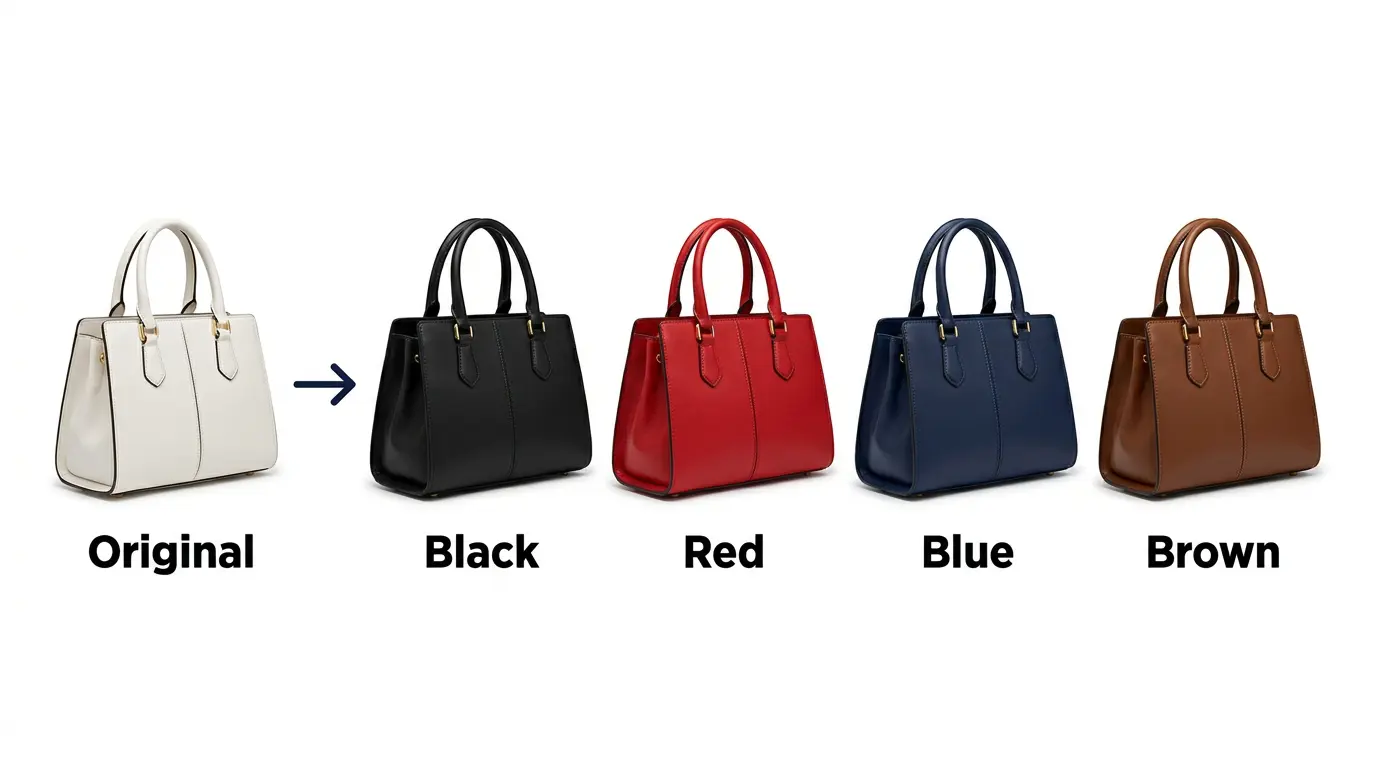
One of the most popular and widely used applications of Multi-Clipping Path is changing product colors. Because each part’s path is saved separately, an editor can select a specific section and apply a new color to it. All while preserving the original texture, shadow, and lighting of the image.
That said, realistic color adjustment is a genuinely important skill here. Simply applying a new color isn’t enough. The fabric’s texture, shadows, and highlights all need to be preserved so the final image still looks believable. Poorly done color changes often end up looking flat or artificial, losing the fabric’s natural depth and folds. Which can undermine customer trust and make a product look fake or obviously “Photoshopped.”
That’s why skilled editors work carefully with tools like Hue/Saturation, Color Balance, or specific blending modes. When changing colors, making sure the original lighting and shadow structure stays intact. This kind of editing has become increasingly popular in e-commerce catalogs. Since it lets a brand present every color variant of a product in one place. At the same visual quality making the shopping decision faster and easier for customers.
Multi-Clipping Path vs. Other Image Editing Services
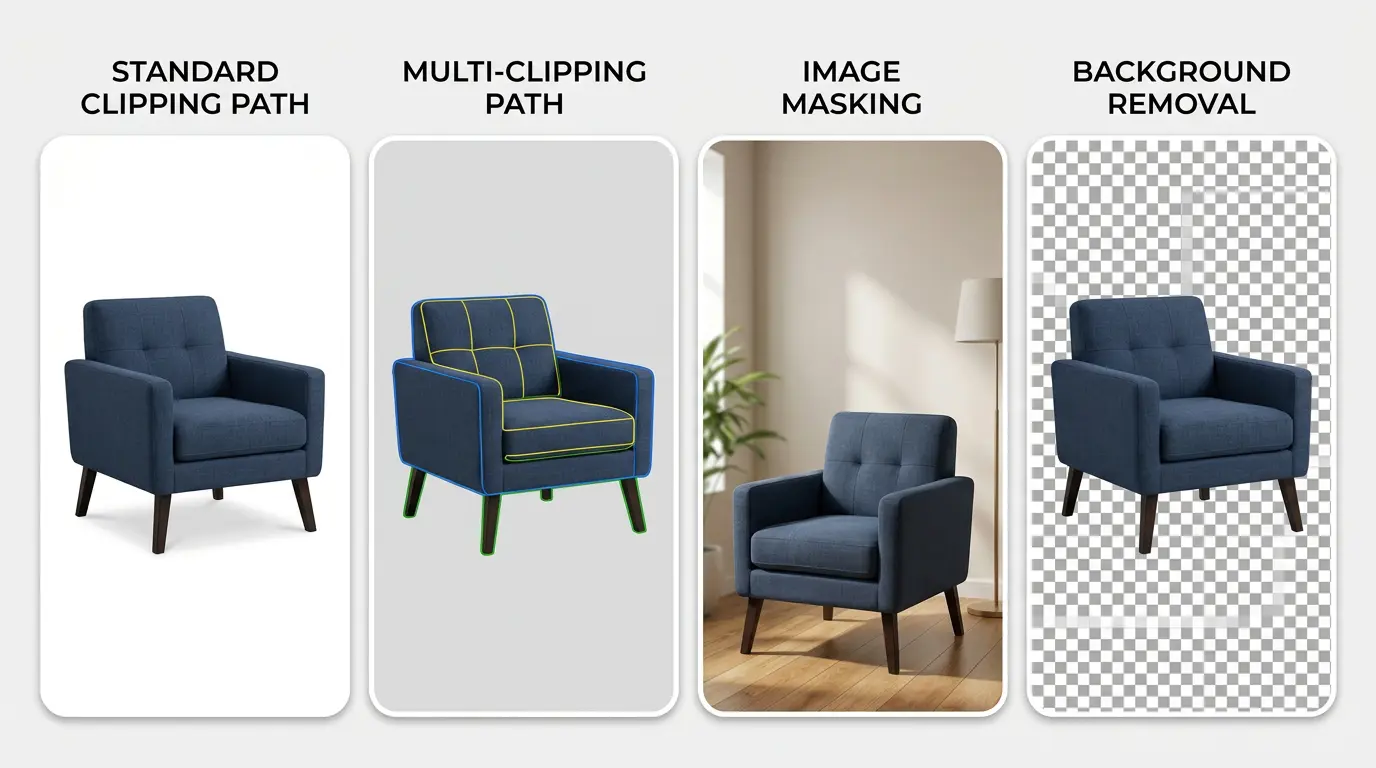
The image editing world has several different services that can sound similar on the surface but actually serve very different purposes. Plenty of new business owners end up ordering the wrong service simply because they don’t understand. The distinctions are wasting both time and money in the process. The table below offers a quick comparison to help clarify which service fits which situation.
| Service | Best For |
| Standard Clipping Path | Single object isolation |
| Multi-Clipping Path | Multiple objects or product parts |
| Image Masking | Hair, fur, complex edges |
| Background Removal | Removing unwanted backgrounds |
| Photo Retouching | Improving image appearance |
This comparison makes it clear that each service has its own specific use case. For hair or fur, Image Masking is the better fit, since tracing every strand of hair with the Pen Tool simply isn’t practical. If all you need is a clean background removal, that service alone will do the job. But when multiple parts of the same image need to be controlled independently, Multi-Clipping Path is really the only technique that gets the job done properly. Which service you actually need comes down to how complex the image is and how much control you need over the final result.
How to Choose a Multi-Clipping Path Service

Picking the right Multi-Clipping Path service isn’t as straightforward as it might seem . The market is full of providers, but not all of them deliver the same quality. Here are what to look for when making that choice.
Start by evaluating how experienced the editors are and how skilled they are in Photoshop specifically. Since Multi-Clipping Path is an entirely manual process, there’s no substitute for real hands-on skill in manual path creation. Edge accuracy and consistent results across a batch of images are two things worth checking closely. And the best way to check is by looking at their previous work samples or portfolio before placing an order.
A good provider will also have a solid quality control process in place. Checking every image more than once before delivery and fixing any issues that come up. If your business needs bulk image editing. Say, hundreds or thousands of product photos at once. Make sure the provider can genuinely handle that volume, since not every editing company has the capacity to manage large batches efficiently.
Finally, fast turnaround time and transparent pricing are two more important signs of a provider you can trust. A reliable service will always be upfront about how long a job will take and what it will cost, with no hidden charges along the way.
How Much Does Multiple Clipping Path Service Cost in New York, USA?
The cost of a Multiple Clipping Path Service in USA, New York typically ranges from $2 to $10 per image, depending on how detailed the product shot is. Simple items like T-shirts or bottles sit at the lower end, while intricate products like jewelry, hair, or layered food shots can push past $15 per image. Most professional studios in New York offer flexible pricing, whether you’re ordering a single image or a bulk product catalog, making it easy to find a rate that fits your budget and project size.
Why Choose Professional Multi-Clipping Path Services?
A lot of people assume that knowing a bit of Photoshop is enough to handle this kind of editing in-house. In reality, working with a professional service comes with several meaningful, long-term advantages that aren’t always obvious at first glance.
For one, professional editors produce far more accurate paths. Which noticeably improves the quality of the final image. Years of experience working through thousands of images gives them the skill to handle even the most complex photos with precision. They’re also better positioned to maintain consistent image quality across a large product catalog, and that consistency matters. Because a catalog with some sharp images and some sloppy ones ends up weakening the whole brand’s presentation.
Outsourcing this work also frees up your own team’s time, letting them focus on marketing, product development, or customer service instead. For bulk e-commerce image editing specifically, professional services tend to be far more effective. Since they come with a dedicated team, an established workflow, and a proper quality assurance process. Something that’s often hard for a single freelance editor to maintain at scale.
Altogether, a professional service gives you a genuinely polished final output. One that strengthens your brand’s image and helps you stay competitive in a crowded market. It also makes your product presentation feel more trustworthy in the eyes of your customers.
At Grasigner, our team is made up of experienced Photoshop editors who work through thousands of e-commerce product images every day, and we hold every project to a high standard. If your product catalog needs a reliable, fast, and quality-driven Multi-Clipping Path service, visit grasigner.com and let’s get your first project started.
Frequently Asked Questions About Multi-Clipping Path
What is Multi-Clipping Path?
Multi-Clipping Path is a Photoshop technique where multiple objects or sections within a single image are given their own individual paths, allowing each one to be edited independently. It’s especially useful for images where different parts of a product need different kinds of edits.
How is Multi-Clipping Path different from Clipping Path?
A standard Clipping Path only separates one object from its background. Multi-Clipping Path separates multiple parts of the same image, each with its own independent path, so each can be edited on its own. In short: one single path versus several independent ones.
Can Multi-Clipping Path change product colors?
Yes — in fact, this is one of the most common and popular applications of the technique. It allows multiple realistic color variations of a product to be generated from a single source image, significantly cutting down on the cost of the original photoshoot.
Is Multi-Clipping Path useful for e-commerce?
Absolutely. It helps maintain consistency across a product catalog, makes generating multiple variations easier, and reduces the need for repeated photoshoots — making it a genuinely valuable investment for any e-commerce business.
Can Multi-Clipping Path be used for bulk images?
Yes, though since it’s an entirely manual process, handling bulk images requires a skilled team with enough capacity to keep turnaround times reasonable and deliver everything on schedule.
How is Multi-Clipping Path created in Photoshop?
You typically create it by manually drawing separate paths around each section with the Pen Tool. Then, convert the paths into selections or masks and save each one separately in the Channels panel for later use.
How much does Multi-Clipping Path Service cost?
Cost depends on how complex the image is, how many paths are needed, and how many total images require editing. It’s generally more expensive than a standard Clipping Path, since it takes more time, effort, and skill to execute properly. That said, over the long run, since it cuts down on the need for repeated photoshoots, it often ends up being a cost-effective investment overall.
Final Thought
All in all, Multi-Clipping Path stands out as one of the most powerful and effective techniques in modern product photo editing. It doesn’t just make a single image look good. It lets you pull multiple variations from one core photo, saving real time and real money in the process.
In e-commerce and product photography. Where new product variations need to be shown to customers constantly. Multi-Clipping Path has become close to an essential tool. Fashion, jewelry, footwear, furniture, cosmetics. Nearly every industry that sells physical products is leaning on this technique more and more, because businesses are increasingly recognizing that it cuts production costs while also raising the overall quality of their product presentation.
That said, getting accurate, believable results still requires a skilled, experienced editor. This work demands as much precision as it does creativity. A poorly drawn path or an unrealistic color adjustment can ruin an otherwise great image. Working with a professional service gets you consistent, accurate, and scalable results. The kind that keeps your brand competitive and makes your product presentation genuinely trustworthy to your customers.
Ready to Get Started?
If your product catalog is still stuck doing repeat photoshoots for every color variant, it’s time to change that. Grasigner specializes in Multi-Clipping Path and other product photo editing services built specifically for e-commerce, fashion, and jewelry brands with accurate paths, consistent results, and turnaround times that actually work for growing catalogs.
Visit grasigner.com today to request a free sample edit and see exactly what Multi-Clipping Path can do for your product images.