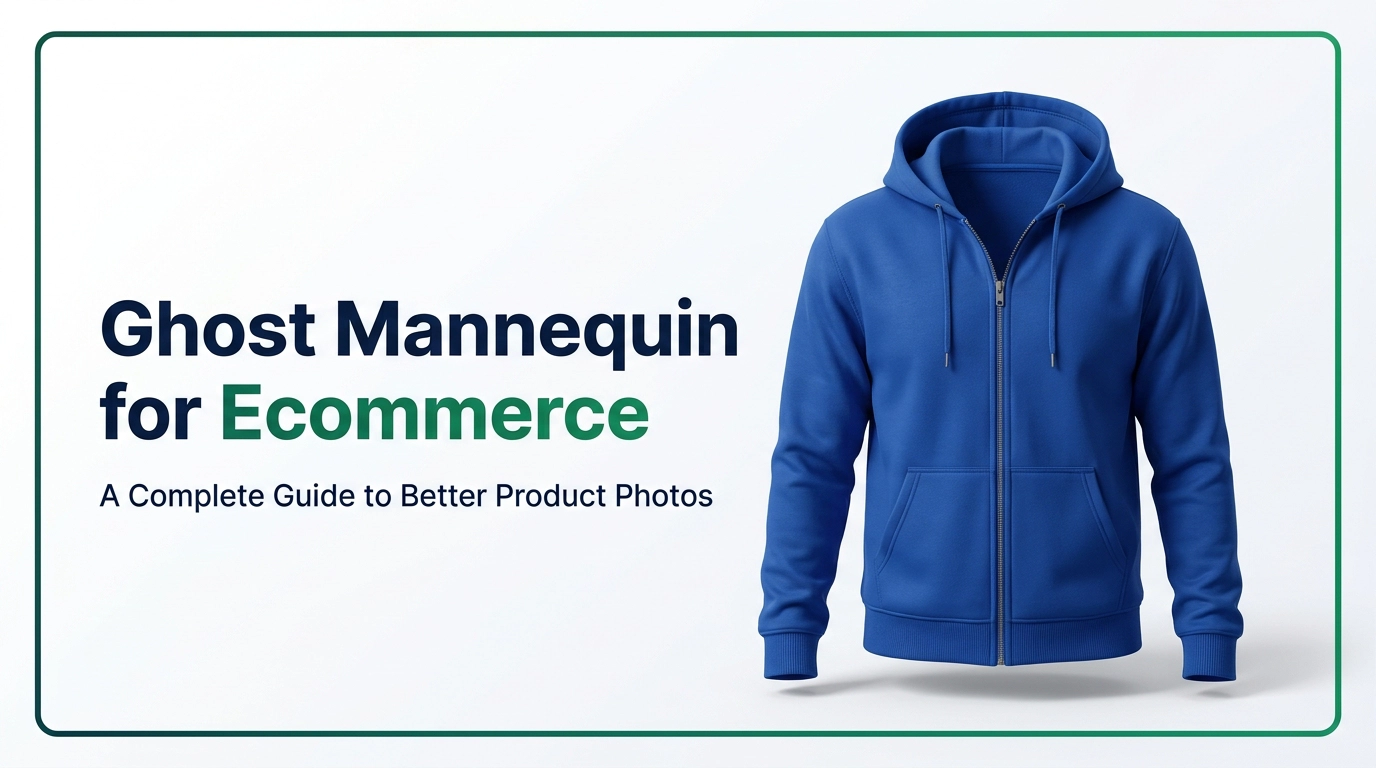
You’ve probably seen ghost mannequin for ecommerce photos many times, even if you never knew what to call them. Picture yourself shopping for a jacket online. The photo shows it with full shoulders, a neat collar, and sleeves that hang the way they should. There’s no model, no hanger, and no mannequin. It just looks like an invisible person is wearing it.
That’s the ghost mannequin effect, and it’s one of the most popular ways to photograph clothes for online stores. If you’re looking into it, you likely have a real problem to solve. How can you make your clothing look professional, consistent, and trustworthy without paying for a full model shoot every time you add a new product?
Here’s the thing about buying clothes online. Customers can’t touch the fabric, try on the fit, or look closely at the stitching. All they have are your photos. If the photos look messy, shoppers get nervous and leave. If they look clean and well shaped, people feel much safer clicking the “add to cart” button.
In this guide, we’ll explain what ghost mannequin photography is, why it matters, and how the editing process works step by step. We’ll look at the different types and compare it to flat lay photography. We’ll also cover best practices, common mistakes, pricing, and tips for picking a service provider. By the end, you’ll know if this style is right for your store.
What Is Ghost Mannequin for Ecommerce?
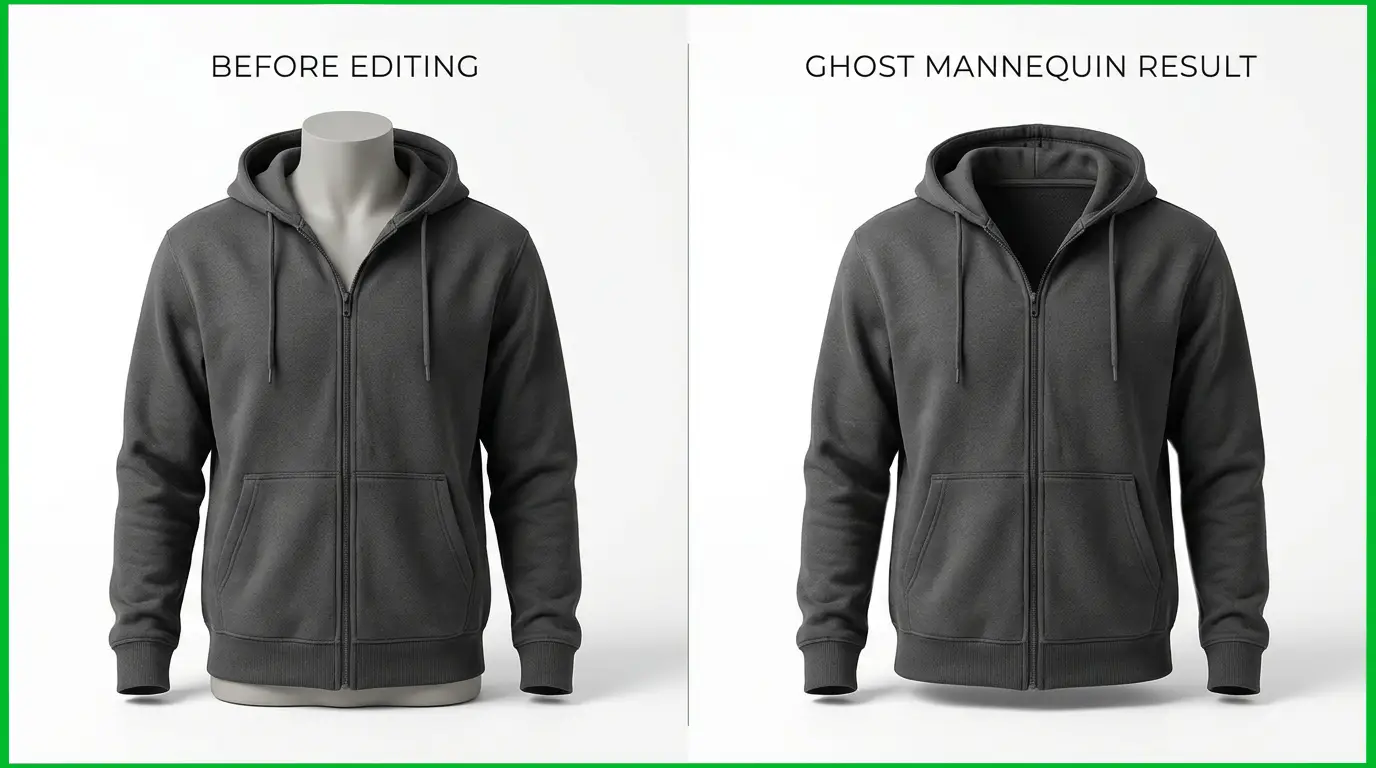
Ghost mannequin photography is a technique where a garment is photographed on a mannequin, and then the mannequin is removed in editing. What’s left is a clean image of the clothing that looks three-dimensional, as if it’s being worn by an invisible body. You’ll also hear it called invisible mannequin photography, and the result is often called the ghost mannequin effect.
For ecommerce, this style is a go-to because it shows how a garment is actually shaped. A flat shirt on a table can look boxy or limp. The same shirt on a mannequin shows the chest, the shoulders, the drape, and the way the collar sits. Once the mannequin disappears, you get all of that structure without the distraction of a plastic torso.
How the invisible mannequin effect works
The magic isn’t really magic. It’s a combination of smart photography and careful editing. The photographer dresses a mannequin in the garment, pins or clips the fabric so it fits snugly, and shoots it from the front, the back, and sometimes the sides. Then they take extra shots of the inside of the garment, such as the back of the neck, the inside of the sleeves, or the inside of the hem.
In editing, the mannequin is cut out, and those extra shots are blended in to fill the empty spaces. That’s why you can see the inside back of a collar in a finished image, which gives the clothing that hollow, worn-on-a-body look.
Ghost mannequin photography vs. ghost mannequin editing
People often use these two terms as if they mean the same thing, but they’re really two halves of one process.
Ghost mannequin photography is the shooting part. It includes setting up the mannequin, styling the garment, lighting the shot, and capturing all the angles you’ll need later.
Ghost mannequin editing is the post-production part. It happens in software like Adobe Photoshop, where an editor removes the mannequin, builds the neck joint, cleans up the edges, fixes wrinkles, and corrects the colors.
You need both to get a great result. Great photos with bad editing look unnatural, and great editing can’t fully rescue a poorly shot image. Many brands shoot in-house and send the files to a professional editing team for the second half, which is a smart way to split the work.
Why Ghost Mannequin Photography Matters for Ecommerce
So why do so many clothing brands use this style instead of just snapping a quick flat photo? A few good reasons come up again and again.
It shows shape and fit clearly
Shoppers want to know how a piece of clothing will look on a real person. A ghost mannequin image gives them a pretty good idea. They can see how the shoulders sit, whether the waist is tapered, how long the sleeves run, and how the fabric falls. That kind of clarity cuts down guesswork, and less guesswork usually means fewer returns and happier customers.
It makes your catalog look professional
Imagine two stores selling similar hoodies. One shows wrinkled, uneven photos taken on a bedroom floor. The other shows clean, shapely images on a crisp white background. Even if the hoodies are identical, the second store looks more trustworthy. Ghost mannequin images give your catalog a polished, brand-ready look that tells shoppers you take quality seriously.
It keeps your images consistent
Consistency is one of the most underrated parts of a good online store. When every product photo uses the same angle, the same lighting, and the same background, the whole catalog feels organized. Shoppers can scan a category page and compare products easily because nothing is jumping around. Ghost mannequin photography makes this simple, since the same mannequin setup can be reused across a whole collection.
It improves the customer experience
Good product images are part of good customer service. When people can see what they’re buying, they feel less anxious about ordering. They also tend to spend more time on product pages that look clear and appealing, and that extra time often leads to more sales.
It makes product presentation more attractive
There’s also a simple visual appeal here. Without a model’s face or a busy background, the garment becomes the star. Details like stitching, pockets, prints, and trims stand out. That’s especially helpful for brands whose designs are the main selling point.
How Ghost Mannequin Editing Works
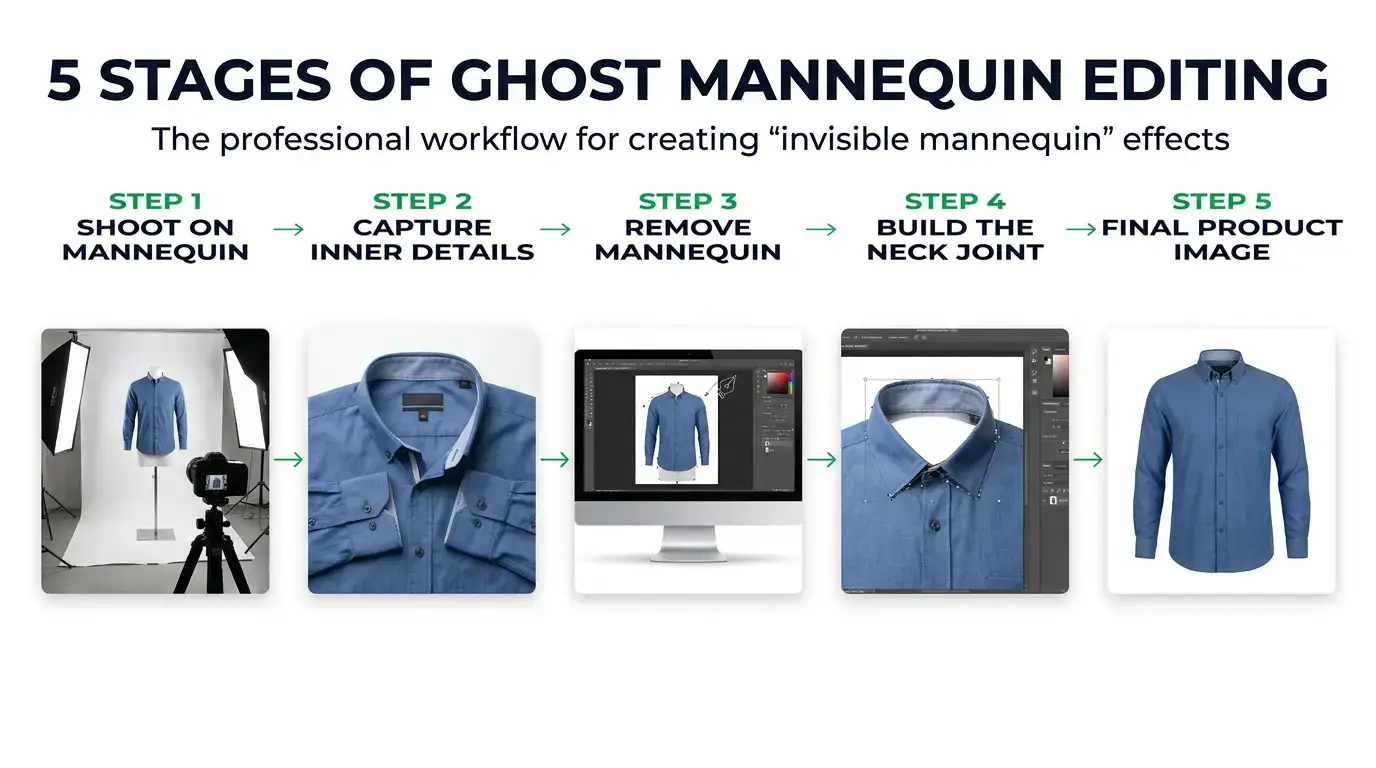
Let’s break down the full process. Whether you do this yourself or hand it off to a team, understanding each step helps you spot good work and bad work quickly.
Step 1: Photograph the Clothing on a Mannequin
Everything starts with the main shot. The garment is placed on a mannequin that matches the type of clothing, whether that’s a torso form for shirts and jackets or a leg form for pants. The photographer smooths the fabric, tucks or pins extra material at the back so the front lies flat and tight, and checks that the seams are straight.
Lighting matters a lot at this stage. Soft, even light reduces harsh shadows and makes the editing much easier later. Most photographers shoot the front, the back, and a few side angles so shoppers can see the full garment.
A quick tip: steam or iron the clothing first. It’s far easier to prevent wrinkles than to edit them out afterward.
Step 2: Capture the Inner Neck or Garment Details
Next, the photographer takes extra shots of the areas that will be hidden by the mannequin. For a shirt, that usually means removing it from the mannequin and photographing the inside back of the collar, or putting the garment on in a way that shows the interior. For a jacket, it might also mean shooting the inside of the sleeves or the lining.
These shots are the secret ingredient. They’re what let the editor fill in the empty space where the mannequin used to be, so the garment looks like it’s hollow and being worn.
Step 3: Remove the Mannequin
Now the editing begins. The editor uses tools like the pen tool or selection masks to carefully cut the mannequin out of the image. This sounds easy, but it takes patience. The edges around the garment need to be crisp without looking jagged or cut out with scissors, especially around loose threads, lace, mesh, or fuzzy fabrics.
Any stands, clamps, or clips used to hold the clothing in place get removed too. A clean cutout is the foundation for everything else.
Step 4: Create the Neck Joint
This is the step that separates average work from great work. Once the mannequin is gone, there’s a gap where the neck, armholes, or hem used to be. The editor takes the inner-neck photo, resizes it, rotates it, and places it behind the front of the garment so it looks like the real back of the collar.
It has to match perfectly in perspective, lighting, and color. If the angle is off, or the inner collar looks too big or too small, the whole image feels strange. A well-built neck joint looks so natural that most shoppers never notice it, and that’s exactly the goal.
Step 5: Adjust Colors, Wrinkles, and Shadows
With the structure in place, the editor cleans up the finer points. Color correction makes sure the garment on screen matches the real thing, which is a big deal for avoiding returns. If a navy sweater looks black in the photo, someone is going to be disappointed.
Wrinkles and creases get softened, but not erased completely. Fabric needs some natural texture to look real. Shadows are balanced so the garment has depth without looking dirty or uneven. Small flaws like lint, dust, or loose threads are cleaned up as well.
Step 6: Prepare the Final Ecommerce Product Image
Finally, the image is polished for publishing. That usually means placing the garment on a clean white or light background, adding a subtle natural shadow if needed, cropping and centering consistently, and exporting the file at the right size and resolution.
Different platforms have different rules. Amazon, Shopify stores, and other marketplaces can each have their own requirements for dimensions, file size, and backgrounds, so it’s smart to check them before you export a whole batch.
Types of Ghost Mannequin Photography for Ecommerce
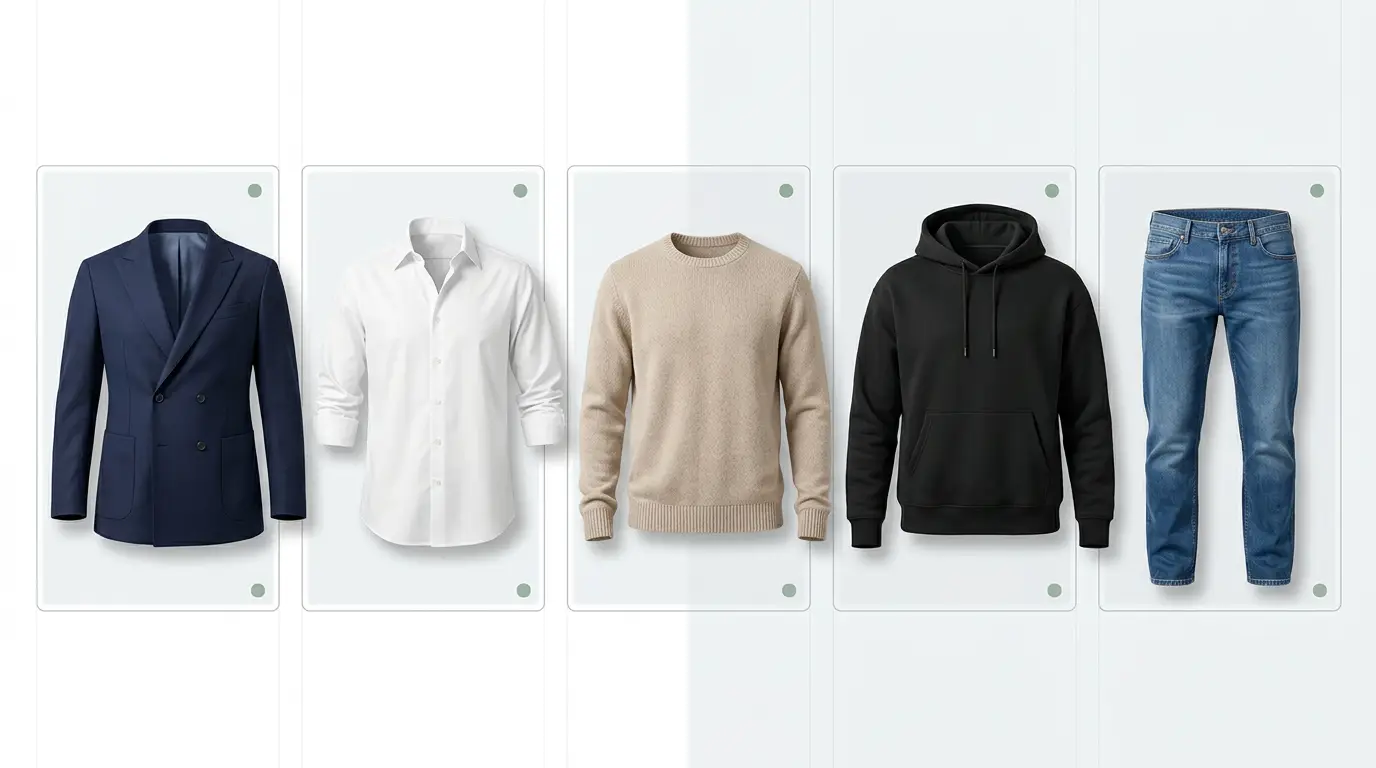
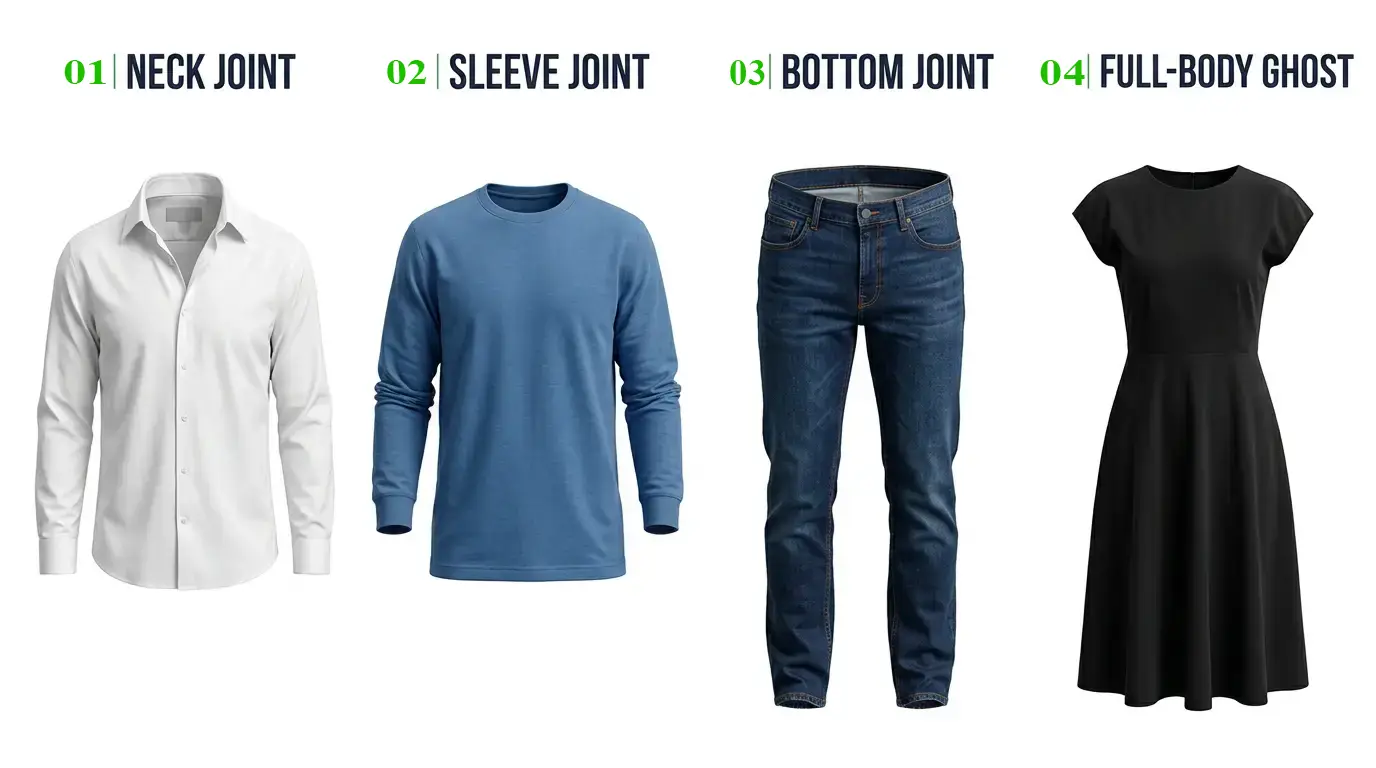
Not every garment needs the same approach. Depending on what you’re selling, you might use one or more of these styles.
Neck joint ghost mannequin
This is the most common type. It’s used for shirts, tops, jackets, dresses, and anything with a collar or neckline. The inner back of the neck is added in editing, so the opening looks hollow and natural.
Sleeve joint ghost mannequin
Sometimes the sleeves need their own attention, especially on jackets, coats, and long-sleeve shirts. A sleeve joint edit shows the inner opening of the cuff or arm so the sleeve looks like it has real volume instead of lying flat.
Bottom joint ghost mannequin
This one is for pants, shorts, skirts, and sometimes the hem of long tops. The inside of the waistband or the bottom opening is revealed, so the garment appears to have a real body inside it.
Full-body invisible mannequin effect
For full outfits, such as a matching set or a dress with layers, the whole mannequin is removed so the complete look appears to be worn by an invisible person. It takes more editing time because several joints need to be built and blended together.
3D ghost mannequin product images
Some brands go a step further and create a 3D look, where the garment appears to have extra depth, and in some cases can be rotated or viewed from several angles. It’s a bit more advanced and often costs more, but it can make your product pages feel very modern and interactive.
Ghost Mannequin vs. Flat Lay Photography
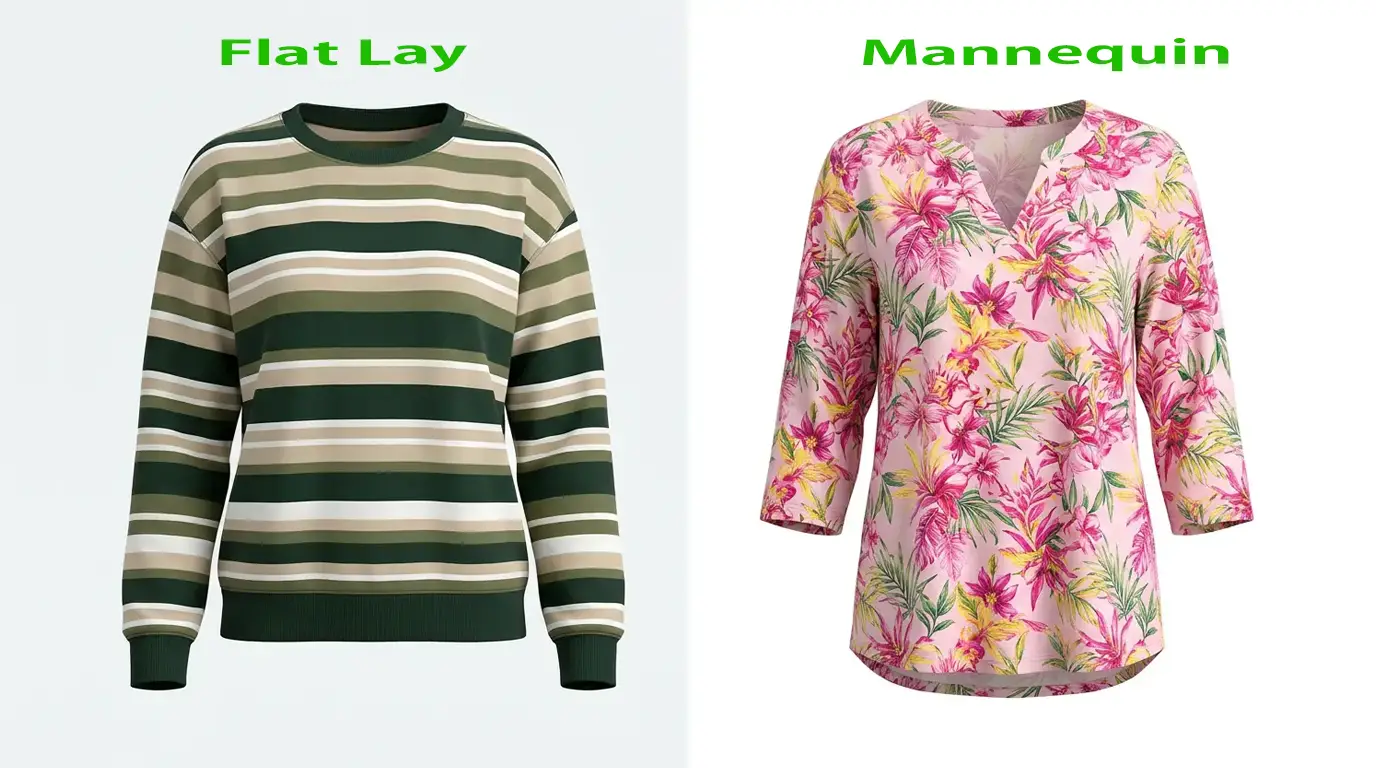
If you’re deciding between ghost mannequin and flat lay photography, you’re not alone. Both are popular, and both can look great. They just do different jobs.
Flat lay photography means arranging the garment on a flat surface and shooting it from above. It’s quick, it’s cheap, and it works nicely for styled, casual looks. Ghost mannequin takes more effort, but it gives the garment a more realistic shape.
Here’s a side-by-side look:
| Feature | Ghost Mannequin | Flat Lay Photography |
| Image appearance | 3D-like garment shape | Flat, overhead presentation |
| Clothing fit | Shape and structure are clear | Shape is less clear |
| Styling | Mannequin-based photography | Arranged on a flat surface |
| Best for | Structured clothing and apparel catalogs | Casual clothing and styled product displays |
| Editing needs | Mannequin removal and joint editing | Background cleanup and image retouching |
So which one wins? It depends on what you sell. If your products have structure, like blazers, button-down shirts, jackets, and polos, ghost mannequin is usually the better choice. If you sell soft, casual items like t-shirts for a streetwear brand, or you want a lifestyle feel with accessories arranged around the garment, flat lay can be a great fit.
Many stores actually use both. They show a ghost mannequin image as the main photo, then add flat lay or detail shots as extra images in the gallery. That mix gives shoppers a full picture without much extra cost.
Best Practices for Ghost Mannequin Ecommerce Images
Want your images to look like they came from a big brand? Keep these habits in mind.
Use consistent lighting: Soft, even light is your friend. If lighting changes from shot to shot, the editor has to work much harder to make everything match, and your catalog will look uneven.
Keep the garment’s natural shape: The goal is to show how the clothing really fits, not how you wish it fit. Don’t over-stuff or over-stretch the garment. Customers will notice the difference when it arrives.
Get the colors right: Accurate color correction is one of the most important parts of the job. Check the final image against the physical product, ideally on a calibrated screen. Wrong colors are one of the top reasons for returns.
Use a clean white background when it fits: Many marketplaces require white or very light backgrounds, and it keeps the attention on the garment. If your brand uses a colored or styled background, that’s fine for your own site, but always check the platform rules first.
Keep your framing consistent: Use the same size, the same margins, and the same angle for every product in a collection. When shoppers browse a category page, it should feel like one smooth, organized set.
Show fabric texture and details: Don’t blur away the very things that make your product special. Knit patterns, stitching, buttons, zippers, and prints should all stay sharp and clear. If a garment has an important detail, add a close-up shot.
Common Ghost Mannequin Editing Mistakes to Avoid
Even experienced editors slip up sometimes. Here are the mistakes that show up most often, and why they hurt.
Unnatural neck joints: If the inner collar is too tall, too wide, or at the wrong angle, the image looks fake right away. The back of the neck should line up with the front and match the garment’s real proportions.
Distorted garment shape: Pulling and stretching a garment too much in editing can make shoulders look uneven or the body look lopsided. The finished image should look like the clothing you’re actually selling.
Incorrect colors: It’s easy to lose the true color when editing, especially with bright reds, deep blues, and pastels. Always compare against the real item before you approve a batch.
Removing too many wrinkles: A little texture makes fabric look real. When every wrinkle is smoothed away, the clothing can look plastic or computer generated. Aim for neat, not perfect.
Uneven lighting and shadows: Dark patches on one side, or shadows that don’t match from image to image, make your catalog look sloppy. Balanced shadows give a garment depth without drawing attention to themselves.
Poor edges around the garment: Rough, jagged, or halo-like edges are a dead giveaway of rushed work. Zoom in to 100 percent when you review images, because these flaws are easy to miss at a smaller size.
How Much Does Ghost Mannequin Editing Cost?
This is the question almost everyone asks, and the honest answer is: it depends. Prices vary a lot between providers, and there’s no single number that works for everyone. Here are the main things that shape the cost.
Per-image pricing: Most editing services charge by the image. Simple shirts or tops usually cost less, and more detailed pieces cost more.
Image complexity: A plain t-shirt is quick to edit. A layered jacket with a lining, a hood, and several zippers takes much longer. Sheer fabrics, lace, fur, and mesh are trickier because the background shows through and the edges are harder to cut cleanly. The more work an image needs, the higher the price tends to be.
Bulk discounts: If you have a large catalog, ask about volume pricing. Many providers lower the per-image price when you send dozens or hundreds of photos at once, and some offer ongoing discounts for regular clients.
Turnaround time: Standard delivery is usually cheaper than rush service. If you can plan ahead and give your editor a bit more time, you’ll often save money.
In-house editing vs. outsourcing: Doing it yourself means hiring or training someone, paying for software, and keeping up with the time it takes. That can make sense for very large brands with steady work. For most small and mid-sized stores, outsourcing is more practical, since you pay only for what you need and don’t have to manage a team.
Before you decide, request a quote based on your actual products rather than relying on a general price list. Different garments take different amounts of work, and a good provider will tell you upfront what you’ll pay.
How to Choose a Ghost Mannequin Service Provider
There are plenty of editing companies out there, and they’re definitely not all equal. Here’s what to look for when you’re comparing options.
Image quality and portfolio: Start with samples. A good provider should be happy to show you before-and-after examples, ideally for garments similar to yours. Look closely at the necklines, the edges, and the colors.
Editing consistency: One great image doesn’t mean much if the next ten look different. Check whether the team keeps the same style, the same sizing, and the same background across a whole batch.
Turnaround time: Ask how quickly they can deliver and whether they can handle rush orders when you have a launch coming up. Reliable delivery matters just as much as quality.
Pricing transparency: You should know what you’ll pay before work starts. Be careful with providers who are vague about costs or add surprise fees later.
Quality control: Does the company review images before sending them back? A solid process, with a second set of eyes and clear revision policies, helps catch mistakes early.
Free trial availability: A free trial is one of the best ways to test a provider. You send a few images, see what comes back, and decide with no pressure. If a company won’t let you try before you commit, that’s worth noting.
Secure file delivery: Your product photos are valuable, especially if you’re launching new designs. Make sure the provider has safe ways to transfer and store your files.
If you want a team that checks these boxes, GRASIGNER is worth a look. They offer professional ghost mannequin editing for clothing brands and online sellers, with a focus on clean results, consistent catalogs, and reliable delivery. It’s a good idea to ask for a free trial so you can see their work on your own products first.
Is Ghost Mannequin Photography Worth It for Ecommerce?
For most clothing brands, yes. The investment pays off in a few clear ways.
First, it improves how your products look and feel to shoppers. Clear shape, clean edges, and accurate colors build confidence. Second, it keeps your catalog consistent, which makes your store feel organized and trustworthy. Third, it reuses simple setups, so once you’ve got your process down, adding new products gets faster and easier. And finally, it saves you the cost and hassle of hiring models, booking studios, and coordinating schedules for every collection.
That said, ghost mannequin isn’t the answer for everything. If you sell very soft or unstructured pieces, like lightweight loungewear or scarves, flat lay or on-model photography might show them better. If your brand is built around lifestyle and personality, model photos help shoppers picture themselves wearing your clothes. And if you’re just starting out with a tiny budget and a handful of items, simple flat lay shots can get you through the early days.
The best approach is to match the method to your products, your budget, and your customers. Plenty of successful stores mix styles: ghost mannequin for the main image, a model shot for inspiration, and a close-up for fabric detail.
Get Professional Ghost Mannequin Editing Services from GRASIGNER
If you’re ready to upgrade your product photos, you don’t have to figure it all out alone. GRASIGNER helps clothing brands, ecommerce stores, and photographers turn ordinary mannequin shots into clean, professional, ready-to-sell images, with natural neck joints, accurate colors, and consistent results across your whole catalog.
Not sure if it’s the right fit? Take a look at the GRASIGNER ghost mannequin service page and ask about a free trial. Send over a few of your own photos, see the results for yourself, and decide when you’re ready. It’s a simple, low-risk way to find out how much better your product images can look.
Frequently Asked Questions
1. What is ghost mannequin for ecommerce?
Ghost mannequin for ecommerce is a product photography and editing technique where clothing is photographed on a mannequin and then the mannequin is removed in post-production. The result is a clean, three-dimensional image of the garment that looks like it’s being worn by an invisible body. Online stores use it to show shape and fit clearly without needing a model.
2. How does ghost mannequin photography work?
A photographer dresses a mannequin in the clothing and shoots it from several angles. Then they take extra photos of the hidden areas, like the inside of the collar. In editing, the mannequin is removed and the inner shots are blended in to fill the gaps, creating a natural hollow look. Final touches include color correction, wrinkle cleanup, and background work.
3. Why do clothing brands use ghost mannequin images?
Brands use them because they show how a garment is shaped, keep the catalog consistent, and look professional. They’re also more affordable and flexible than model shoots, since the same setup can be used again and again across many products.
4. Is ghost mannequin photography better than flat lay photography?
Not always, but often for structured clothing. Ghost mannequin gives a more realistic, 3D look that shows fit clearly, which works well for shirts, jackets, and blazers. Flat lay is faster and cheaper, and it can look great for casual items and styled displays. The right choice depends on what you sell and how you want it presented.
5. How much does ghost mannequin editing cost?
There’s no single price. Cost depends on the number of images, how complex each garment is, how fast you need the files, and whether you qualify for bulk discounts. The best move is to ask a provider for a quote based on your real photos, and to ask about trial options before committing.
6. Can ghost mannequin editing improve clothing product images?
Yes. Professional editing cleans up edges, fixes colors, balances shadows, softens distracting wrinkles, and builds natural neck and sleeve joints. Even good photos can look much better after careful editing, and the difference is usually clear to shoppers right away.
7. How do I choose a ghost mannequin editing service provider?
Look at their portfolio, check for consistent results, confirm their turnaround times, and make sure pricing is clear. Ask about quality control and secure file delivery, and try a free trial if one is offered. Testing a few sample images is the easiest way to see whether a provider fits your needs.
Final Thought
Great product images won’t fix a weak product, but they’ll make sure a good one gets noticed. Whether you shoot in-house or work with a team like GRASIGNER, taking the time to do ghost mannequin photography right can make your store look sharper and help customers buy with confidence.
And you don’t have to take our word for it. Send us one image and we’ll edit it for free. You’ll see the difference on your own product, with no commitment and nothing to lose.