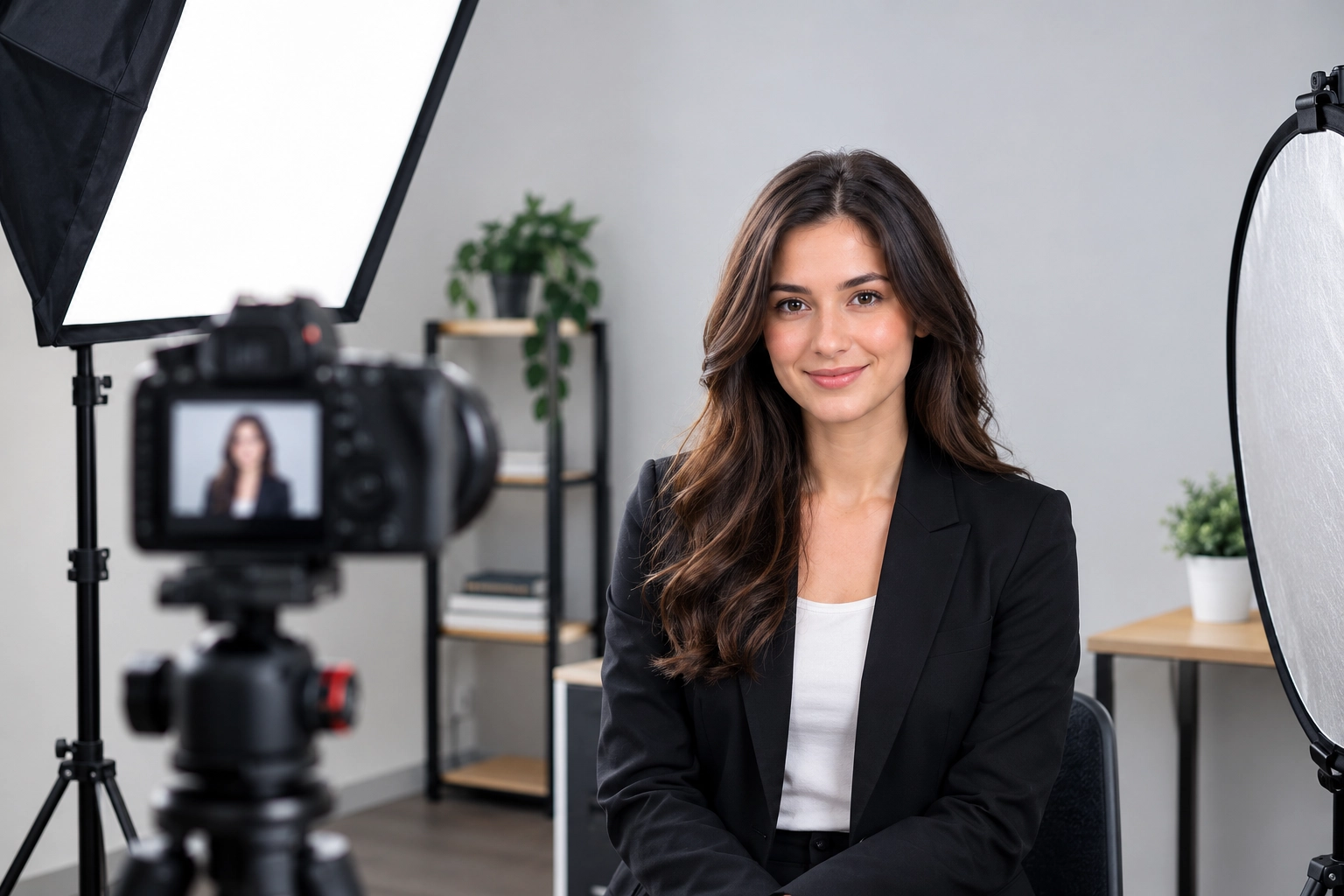
Your professional headshot often introduces you before you ever shake someone’s hand. Whether you’re updating your LinkedIn profile, building a personal brand, or getting ready to apply for a new job, a clear and natural-looking photo can help you make a strong first impression.
The good news is that you don’t need a fancy camera or a pricey studio to get there. If you’ve been wondering how to take a professional headshot on your own, it really comes down to a handful of simple things: soft light, a clean background, a flattering camera angle, a relaxed pose, and light editing. Get those right, and even a phone can give you a photo you’re proud to use on your resume, your company website, or your portfolio.
In this guide, you’ll learn what makes a headshot work, seven practical tips you can use today, how to shoot at home or with an iPhone, how to pose, which mistakes to skip, and how to edit without going overboard.
What Makes a Good Professional Headshot?
Before you pick up a camera, it helps to know what you’re aiming for. A good headshot isn’t just a pretty picture. It’s a photo that shows the real you, clearly and confidently, in a way that fits your work. When people look at it, they should think, “Okay, that looks like someone I’d like to work with.”
If you’re trying to figure out how to take a good headshot, start by checking these three basics.
Clear and Sharp Facial Details
Your eyes and face are the whole point of a headshot, so they need to be crisp. People connect with eyes first. If they look soft or blurry, the whole photo feels off.
Make sure your camera is focused on your eyes, not on your shoulder or the wall behind you. Tap the screen on your phone to lock focus, and zoom in on a test shot to double-check. Skip anything blurry or low-resolution, too. A photo that looks fine on a small phone screen can fall apart when it’s enlarged on a website or printed in a brochure. Always shoot at the highest quality your camera allows.
Natural Lighting and a Clean Background
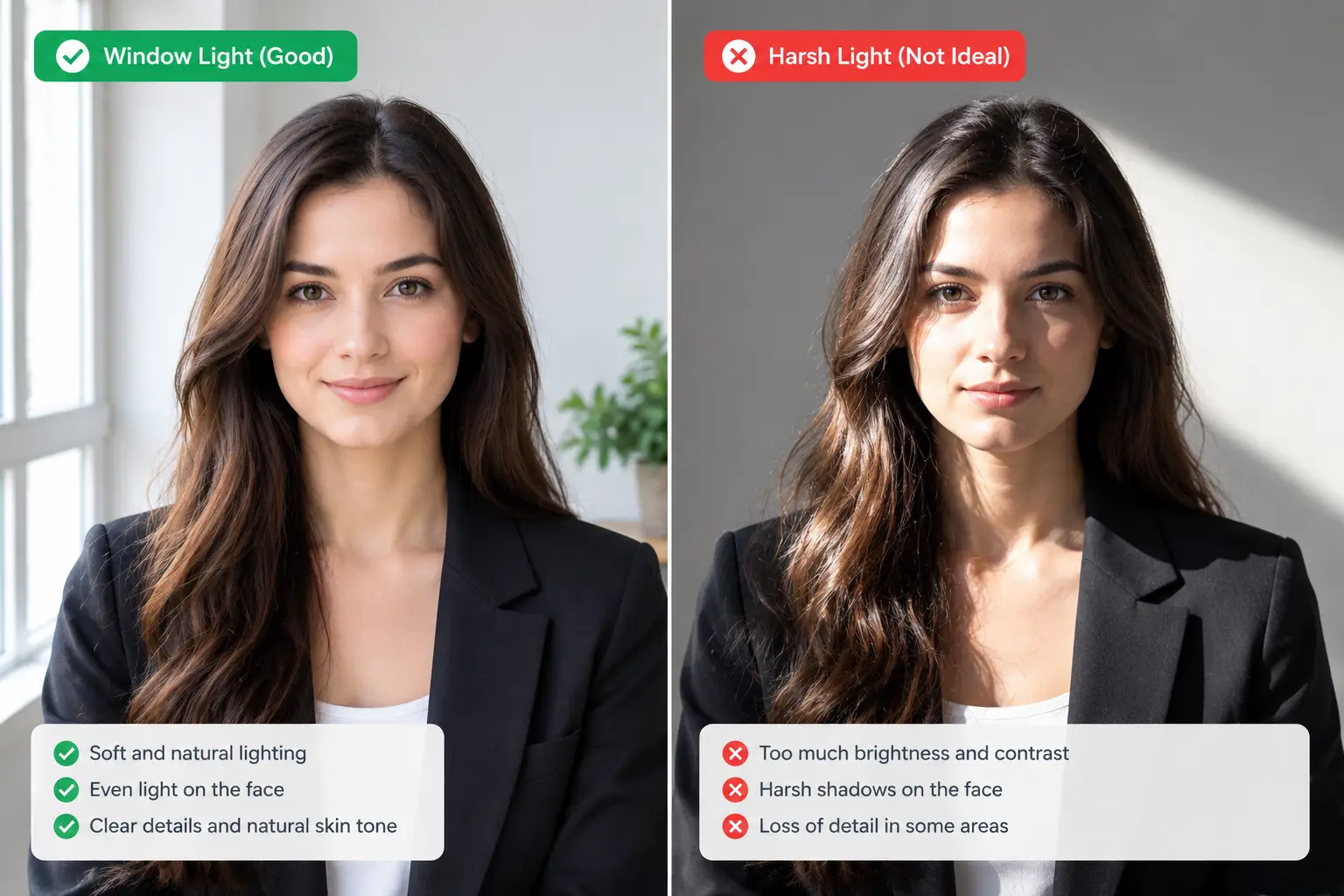
Light does more for a headshot than any piece of gear. Soft, natural light, like the kind you get near a big window, smooths out your features and keeps your skin tone looking healthy. Harsh light does the opposite. It creates deep shadows under your eyes and nose and can make you look tired.
Your background matters just as much. A cluttered bookshelf, a messy kitchen, or a busy street pulls attention away from you. Pick something simple, like a plain wall or a softly blurred space. Before you shoot, glance at your face in the preview and look for heavy shadows. If one side looks too dark, move closer to the light or turn slightly toward it.
A Natural Expression and Professional Appearance
The best headshots feel relaxed. You don’t need a big, stiff grin or a serious “passport photo” face. Aim for an expression that feels like you on a good day: warm, calm, and approachable.
What you wear counts, too. Choose something comfortable that fits well and suits your profession. A lawyer might wear a blazer, while a graphic designer might go with a clean knit top. The goal is a photo that matches your personality and your career, so anyone who meets you later thinks, “Yep, that’s them.”
That’s really the big idea here. A good headshot isn’t about looking perfect. It’s about looking like the best, most believable version of yourself.
How to Take a Professional Headshot: 7 Essential Tips
Now for the main event. These seven tips cover everything you need to get started. You can follow them one at a time or work through them all in a single afternoon. If you only remember one thing about how to take a professional headshot, remember this: simple and natural beats are complicated every time.
1. Choose the Right Lighting
Lighting is the biggest factor in how your photo turns out, so start here. The easiest option is window light. Stand facing a large window, or turn slightly so the light hits one side of your face. The glass spreads the light out and makes it soft and flattering.
Try to avoid direct sunlight. It might feel bright and cheerful, but it creates squinting, sharp shadows, and shiny spots on your skin. If the sun is streaming straight in, hang a thin white curtain or sheet over the window to soften it. Overcast days are actually great for headshots because the clouds act like a giant natural diffuser.
If one side of your face is still too dark, bounce some light back. A white poster board, a foam board, or even a light-colored towel held just out of frame can fill in those shadows. If you have a small soft lamp, that works too. Just keep it gentle and avoid a bare bulb pointed straight at your face.
2. Select a Simple Background
A good background stays out of the way. A plain wall in white, light gray, or a soft neutral color is usually the safest choice. Textured walls, like painted brick or a light wood panel, can also look great as long as they aren’t busy.
Think about contrast, too. If you’re wearing a light shirt, a slightly darker background helps you stand out. If you’re wearing dark clothes, a lighter backdrop does the same job. When your outfit blends into the wall, you can end up looking like a floating head.
Before you shoot, take a quick look behind you. Move the plant, the coat rack, the picture frame, anything that might sneak into the shot. It takes thirty seconds and saves you a lot of editing later.
3. Wear Appropriate Clothing
Pick an outfit that fits your line of work and makes you feel confident. If you’re in a corporate setting, a blazer or a collared shirt is a safe bet. If you work in a creative field, you have more room to show personality with color or texture.
Avoid loud patterns, tiny stripes, and large logos. Busy prints can look strange on camera and pull attention away from your face. Solid colors, especially medium tones like navy, teal, burgundy, or soft gray, usually look best.
And don’t forget the basics. Iron your clothes, check for lint, and make sure your collar sits properly. Little wrinkles that you’d never notice in person can look surprisingly big in a close-up photo.
4. Find Your Best Camera Angle
The camera should sit at eye level or just slightly above it. Holding it too low points the lens up your nose and can make your chin look heavy. Holding it too high can make your head look small and your forehead look big.
Pay attention to how your head and shoulders sit, too. Many people look best with their shoulders turned slightly away from the camera and their face turned back toward the lens. This simple move adds a little shape to the photo and keeps you from looking boxy.
Don’t settle for the first angle you try. Take a few shots straight on, a few with your head tilted a tiny bit, and a few from slightly different heights. You’d be surprised how much one small change can improve the way you look.
5. Use a Natural Pose and Expression
Start by relaxing your shoulders. Most of us hold tension up near our ears without realizing it. Take a deep breath, let your shoulders drop, and shake out your arms for a second before you take the shot.
Look right into the camera lens, not at the screen. When you look at the lens, the final photo feels like you’re making eye contact with the viewer, and that’s what builds trust.
For your expression, a soft smile usually works best. Try thinking of something that makes you smile, like a funny memory or a friend’s joke, instead of just saying “cheese.” If a smile doesn’t fit your field, a calm, confident neutral look can work just as well. The key is to avoid tense jaws and stiff lips.
6. Frame Your Headshot Correctly
Framing is how much of you shows up in the photo. For most headshots, you want your head and the tops of your shoulders in the frame, with a little bit of space above your head. Think of it like leaving a small cushion of air above you.
Don’t cut off the top of your head, and don’t leave a huge empty gap either. Also, avoid standing too far away. If you shoot from a distance and crop later, you’ll lose image quality. It’s better to move in a bit closer, or zoom slightly, while still leaving enough room to crop for different uses.
Speaking of cropping, remember that LinkedIn, websites, and email signatures all use different shapes. Leave a little breathing room around you so you can adjust the crop to a square or a vertical rectangle later.
7. Take Multiple Photos and Choose the Best One
Nobody gets the perfect shot on the first try, and that’s totally normal. Take dozens of photos. Change your expression a little each time: a bigger smile, a smaller smile, a head tilt, a laugh. The best photo is often the one you took when you were starting to relax.
When you review them, zoom in and check the details. Are your eyes sharp? Is the lighting even? Does anything weird show up in the background? Then compare your top picks side by side.
It can also help to ask a friend or coworker which one looks most like you. We’re often our own harshest critics, and a second opinion can save you from picking the wrong photo.
How to Take a Headshot at Home Without Professional Equipment
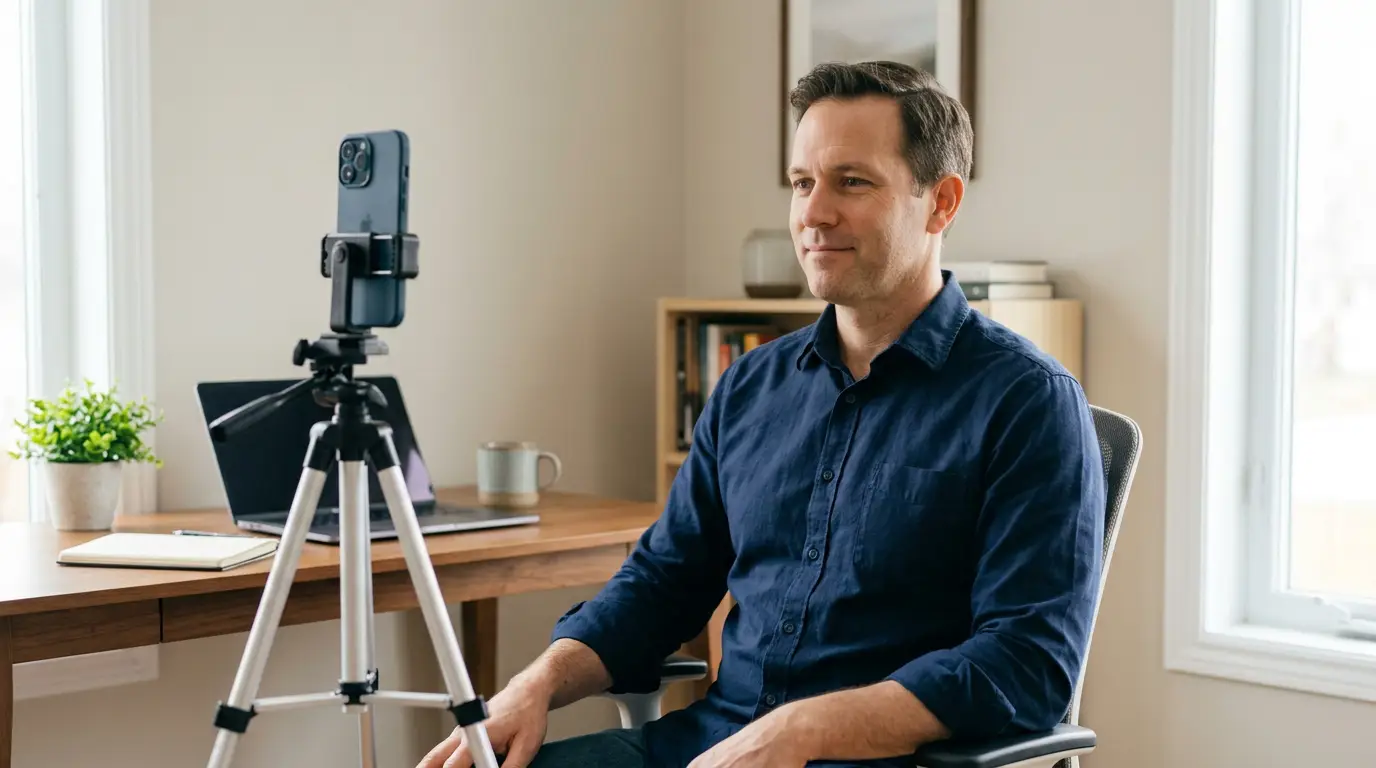
Here’s something a lot of people don’t realize: you really can take a great headshot at home. A regular smartphone, a bit of window light, and a clean wall are enough to get a result that looks polished and professional. If you’ve been putting this off because you don’t own a camera, you can stop worrying.
Let’s walk through how to take a headshot at home, step by step.
Set Up a Simple Home Photography Space
Start by scouting your home for a good spot. Look for a room with a big window, ideally one that gets bright but indirect light. A bare wall nearby is a bonus.
Once you’ve picked your spot, clear the area. Move furniture, take down busy wall art, and tidy up anything that could end up behind you. If you don’t have a clean wall, hang a plain bedsheet or a large piece of fabric. Iron it first, since wrinkles will show up.
Here’s a small trick that makes a big difference: don’t stand right against the wall. Step forward a few feet. That distance helps soften the background and keeps your shadow from landing on the wall behind you.
Use a Tripod or Stable Phone Stand
Holding your phone at arm’s length almost never works. It tilts the angle, distorts your face, and cuts your shoulders off. A tripod or phone stand solves all of that and keeps every shot consistent.
Don’t have a tripod? No problem. Prop your phone against a stack of books on a table, a shelf, or a sturdy box. Just make sure it’s steady and can’t slide or fall. Adjust the height until the lens lines up with your eyes.
Then use your phone’s timer. Set it for three or ten seconds, hit the button, and walk back into position. That’s how you get natural, hands-free photos without needing a helper.
Position Yourself Near a Window
Your window is your studio light, so use it well. Face the window directly, or stand at a slight angle so the light comes from the front and a little to the side. Both setups give you soft, even lighting.
Avoid putting your back to the window. That puts your face in shadow, and your camera will probably try to fix it by making everything look washed out.
Take a test shot and look at it closely. Do you see a dark shadow on one side of your face? Turn a little toward the light or move closer. Does the light feel too harsh? Pull a sheer curtain across the glass or wait for a cloudier moment.
Take Your Own Headshot With a Self-Timer
Once your space and light are ready, it’s time to shoot. Set your camera at eye level, frame yourself from the chest up, and start the timer.
Take a lot of photos. Burst mode or a timer that takes multiple shots in a row can save you time. Between shots, relax, roll your shoulders, and try a different expression.
After each round, check your framing and expression. Are you centered? Is your head tilted too much? Is your smile genuine? It can take a few rounds before you find your rhythm, and that’s perfectly normal. The more you shoot, the more natural you’ll look.
How to Take a Headshot With iPhone

If you own an iPhone, you already have a pretty great camera in your pocket. Recent models take sharp, color-accurate photos that are more than good enough for LinkedIn, websites, and resumes. Here’s how to take a headshot with iPhone and get the most out of it.
Use the Right iPhone Camera Settings
Start with something simple: wipe your lens. Fingerprints and smudges are the number one reason iPhone photos look hazy, and a quick wipe with a soft cloth can make a real difference.
Next, think about which camera to use. The rear camera is usually sharper than the front-facing one, so if you can set up your phone on a tripod and use a timer, the rear camera is often the better choice. Many people also like the look of the 2x or telephoto option for portraits, because it flattens the face in a pleasing way and avoids the wide-angle stretch you can get up close.
If your model supports Portrait mode, try it, but keep reading below because it comes with a few things to watch out for. Before you shoot, tap on your face on the screen to set focus, then slide your finger up or down to adjust brightness if needed. A quick check of focus and exposure helps you avoid surprises later.
One quick note: not every iPhone has the same features. Portrait mode options and lens choices vary by model, so check what your phone offers.
Find the Best Lighting for iPhone Headshots
Just like with any camera, light makes or breaks an iPhone headshot. Natural window light is your best friend. Face the window, or turn slightly to one side, and let that soft glow do the work.
Skip harsh midday sun and overhead lights. They create shadows under your eyes and nose and can make colors look off. Indoor bulbs can also give your skin a yellow or orange tint, so turn them off if you’re using window light.
After you take a test shot, zoom in on your face. Can you see your eyes clearly? Do your skin tones look natural? If something looks off, adjust your position before taking more photos.
Position Your iPhone at the Right Height
Put your iPhone at eye level. If it’s too low, you’ll get that unflattering up-the-nose view. If it’s too high, you’ll look like you’re shrinking.
Use a tripod, a phone stand, or a stack of books to hold it steady. Then turn on the self-timer. On most iPhones, you’ll find it by tapping the small arrow at the top or bottom of the Camera app, then picking a three- or ten-second delay.
Take a handful of shots and review them. Each time, make tiny adjustments to your angle and posture until you find a look you like.
Should You Use Portrait Mode for a Headshot?
Portrait mode can be a handy tool. It blurs the background and makes you stand out, which gives the photo a polished, almost studio-style look. If your background isn’t perfect, a soft blur can hide some of the clutter.
But be careful. Sometimes the blur is too strong and looks fake. Look closely at the edges around your hair and shoulders. If they look jagged, cut off, or oddly smudged, the effect isn’t working. Flyaway hairs are especially tricky, and so are glasses and earrings.
If you notice problems, try turning down the blur using the depth control, or switch back to the regular photo mode and use a cleaner background instead. A natural, slightly soft background often looks better than a heavily processed one.
Edit Your iPhone Headshot Without Overdoing It
The built-in Photos app is all you need for basic editing. Start by adjusting brightness and exposure just a little, so your face looks bright but not washed out.
Then check your white balance and color. Does your skin look too yellow, too pink, or too gray? A small tweak to warmth or tint can fix it. Keep your changes subtle.
Resist the urge to smooth your skin until it looks like plastic. Heavy filters and smoothing tools take away your natural texture and make you look like a different person. The goal is to look like yourself on a great day, not like an airbrushed version that no one would recognize at a meeting. When in doubt, do less.
How to Pose for a Professional Headshot

Even with great lighting and a perfect background, a stiff pose can ruin a photo. The good news is that posing doesn’t have to feel awkward. A few small habits can make you look relaxed and confident.
Keep Your Shoulders Relaxed
Tense shoulders make you look nervous or uncomfortable. Before you shoot, take a deep breath, let your shoulders drop, and roll them back a bit. Sit or stand tall, but not stiff. Think “comfortable and confident,” not “military attention.” Turning your body slightly away from the camera and then looking back at the lens is a classic trick that adds shape and looks natural.
Look Directly at the Camera
Looking right into the lens creates a feeling of eye contact. That’s powerful, because it makes viewers feel like you’re talking directly to them. It’s tempting to watch yourself on the screen, but resist that urge. Pick a spot on the lens and keep your eyes there. If you tend to blink or squint, close your eyes for a moment right before the shot, then open them just as the photo is taken.
Experiment With Different Expressions
Don’t lock yourself into one look. Try a soft, closed-mouth smile, then a more open, friendly one. Try a calm, neutral expression, too. Each one communicates something different. A warm smile feels approachable, while a calm, composed look can feel serious and focused.
A little trick that photographers love: squint your eyes ever so slightly, as if you’re looking at someone you like. That gentle tightening around the eyes makes a smile look more genuine. Take lots of shots and pick the one that feels most like you.
Choose a Pose That Fits Your Profession
There’s no single “correct” pose, and you don’t need a different one for every job. What matters is that your photo matches how you want to be seen in your work. Here are a few general ideas:
- Corporate professionals: A polished, composed look works well. Try a straight-on or slightly angled pose with a soft smile and a neat outfit.
- Entrepreneurs and business owners: Show confidence and warmth. A relaxed, friendly expression helps customers feel like they can trust you.
- Freelancers and creative professionals: You have more freedom to show personality. A casual pose, a bit of color, or a more relaxed setting can help you stand out.
- Job seekers: Aim for clean, friendly, and professional. Hiring managers want to see someone approachable who also takes the job seriously.
Use these as starting points, not strict rules. The best headshot is one that fits your professional identity and still feels like you.
Common Headshot Photography Mistakes to Avoid

Even experienced people slip up. Here are the most common mistakes, and how to dodge them.
Using Harsh or Uneven Lighting
Harsh light, like direct sun or a bright overhead bulb, carves deep shadows into your face and highlights every little line. Uneven light can leave half your face bright and the other half dark. Both can make you look tired or unfriendly. Stick to soft window light and check for shadows before you start.
Choosing a Distracting Background
Busy backgrounds compete with your face. Piles of laundry, bright posters, or random objects pull the viewer’s eye away from you. Keep it plain and tidy, and check the edges of the frame, too.
Taking Photos From the Wrong Angle
Shooting from too low, too high, or too close can distort your features. Wide-angle lenses up close can make your nose look bigger and your face look stretched. Back up a little, use a slightly longer lens setting if you can, and keep the camera at eye level.
Applying Too Much Retouching
Heavy skin smoothing, strong filters, and extreme color changes can make you look fake. People who meet you after seeing a photo like that may feel confused, and that’s not the first impression you want. Keep your edits light and let your real skin texture show.
Using an Outdated Headshot
If your photo is five or ten years old, it might not look like you anymore, and that can be awkward in interviews or meetings. A current photo helps people recognize you and shows that you’re up to date. If your hair, glasses, or style has changed, it’s time for a new one.
How to Edit a Professional Headshot for a Natural Look
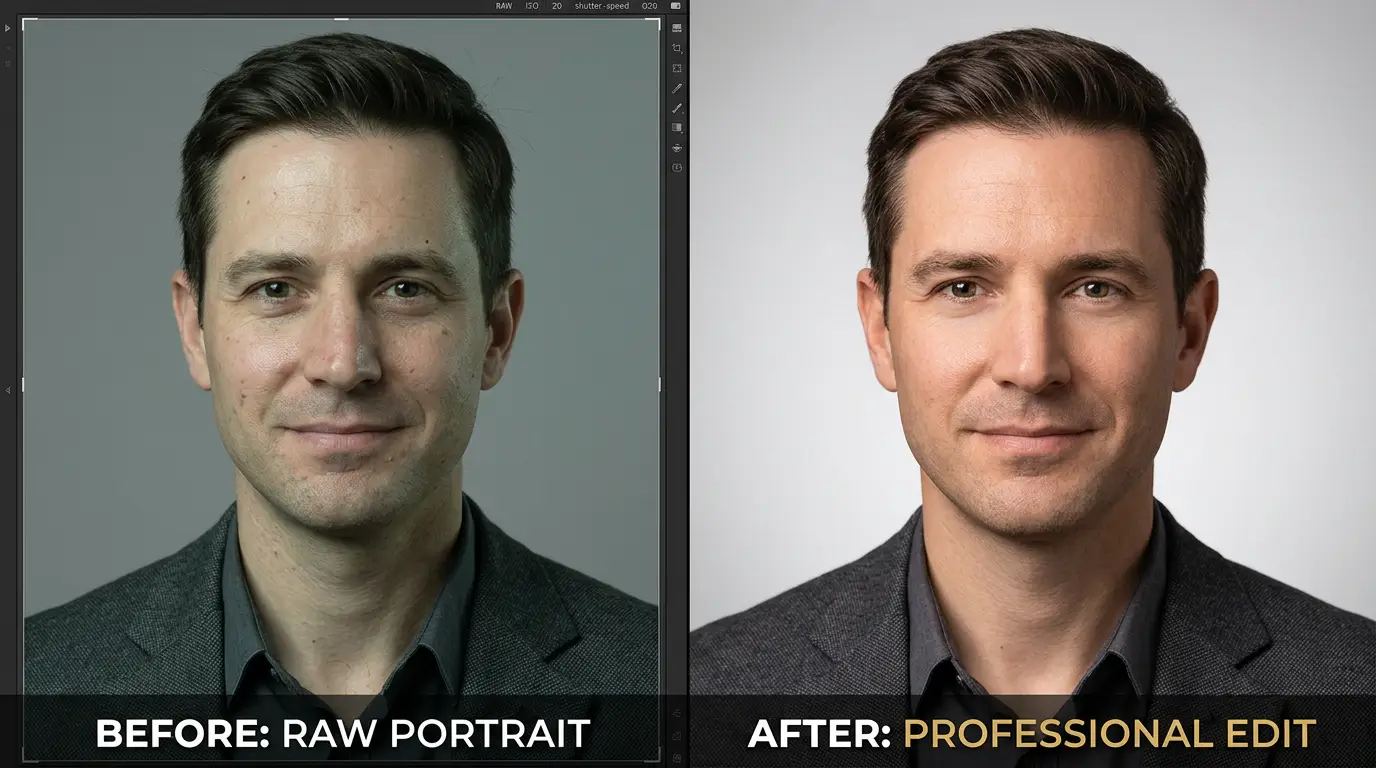
Even a great photo can benefit from a little polish. The trick is to edit with a light hand. You want people to say, “Great photo,” not “Wow, that’s heavily edited.”
Correct Exposure and White Balance
Start with the basics. Adjust brightness so your face is clear but not blown out. Tweak contrast to add a bit of depth. Then fix any color problems. If your skin looks too orange or too blue, a small white balance adjustment can bring it back to normal. These simple fixes alone can make a photo look far more professional.
Remove Minor Distractions
Look around the edges of your photo. Is there a stray outlet, a bit of clutter, or a light switch on the wall? Small things like this can quietly pull attention away from you. Cleaning them up keeps the focus on your face. This kind of subtle cleanup is quick, and it makes a surprisingly big difference.
Retouch Skin While Preserving Natural Texture
It’s fine to soften a temporary blemish or a little shine. But keep your natural skin texture intact. Pores, fine lines, and small freckles are part of what makes a face look real. When you remove all of them, you end up looking flat and unreal. Aim for “fresh and rested,” not “airbrushed.”
Keep the Background Clean and Professional
If your background has uneven spots, wrinkles in a backdrop, or a few distracting marks, you can clean those up with careful edits. You might also gently adjust the tone or blur so it looks smooth and consistent. Just keep the changes believable. A clean, subtle background supports your photo without stealing attention.
When Should You Consider Professional Headshot Retouching?
DIY editing is great for simple fixes. But sometimes you want a more consistent, polished finish, and that’s where professional headshot retouching can help. It’s especially useful if you need photos for a LinkedIn profile, a company website, a corporate team page, or a professional portfolio. When several people need matching photos, a professional editor can keep the lighting, color, and style consistent across the whole group.
Already have a good headshot but want a more polished finish? GRASIGNER can help refine lighting, correct minor distractions, and enhance your image while keeping it natural. Explore our image editing services to see how professional editing can improve your photos.
What Makes a Headshot Look Professional on LinkedIn and Business Websites?

A headshot may end up in lots of places, and each one has its own needs. Here’s what works best on the most common platforms. And if you’re still wondering how to take a good headshot that works everywhere, the answer is to keep it simple and consistent.
LinkedIn Profile Photos
LinkedIn photos are small, so clear framing matters. Your face should fill a good portion of the frame, with your eyes sharp and easy to see. Keep your expression warm and natural, and wear something you’d actually wear to work. A friendly, professional photo can make recruiters and potential clients more likely to click on your profile and feel comfortable reaching out.
Company Websites and Team Pages
On a team page, consistency is key. When every employee has a different background, lighting style, and crop, the page can look messy. A similar background, similar light, and a similar pose across the team create a clean, unified look. It also helps the page match your company’s branding, from color tones to overall style.
Resume, Portfolio, and Personal Branding
If you use a photo on your resume or portfolio, choose a style that suits your field. A creative portfolio might feel more relaxed, while a finance resume may call for something more formal. Make sure the photo still looks like you today. Also, check the file size and dimensions so the image looks sharp on every screen and doesn’t get stretched or pixelated.
One good tip: keep a few versions of your best headshot in different crops, like square, vertical, and horizontal. That way, you’re ready whenever a new platform asks for one.
Frequently Asked Questions About Taking a Professional Headshot
How to Take a Professional Headshot by Yourself?
Start with soft natural light from a window, a plain background, and a steady camera or phone on a tripod. Set the camera at eye level, use the self-timer, and take lots of shots with different expressions. Review them closely, pick the sharpest, most natural-looking one, and make light edits if needed.
How to Take a Good Headshot at Home?
Choose a spot near a window, and use a clean wall or a plain sheet as your backdrop. Stand a few feet in front of the background, set your camera at eye level, and face the light. Soft light and good camera positioning do most of the work, and you can fine-tune from there.
Can I Take a Professional Headshot With My iPhone?
Yes, absolutely. Modern iPhones take sharp, high-quality photos. As long as you have good lighting, solid framing, and accurate focus, you can get a great result. Use a tripod or stand, clean your lens, and check that Portrait mode, if you use it, looks natural around your hair and shoulders.
What Is the Best Lighting for a Professional Headshot?
Soft, diffused natural light is a great starting point, like the light you get near a large window or on a cloudy day. It’s flattering and easy to work with. That said, you can get good results with indoor lighting too, as long as it’s soft and even and doesn’t create harsh shadows.
Should I Smile in a Professional Headshot?
Both a soft smile and a calm, neutral expression can work well. It really depends on your profession, your goals, and your personal brand. A warm smile often feels approachable, while a neutral look can feel serious and focused. Try both and see which feels most like you.
Do I Need to Edit My Professional Headshot?
Not always, and heavy editing usually isn’t needed. Simple adjustments like fixing exposure, balancing color, or removing a small distraction are often enough. The goal is to make the photo look clean and natural, so keep edits subtle and let your real appearance shine through.
How Often Should I Update My Professional Headshot?
There’s no strict rule, but it’s smart to update it whenever your photo no longer looks like you. A new hairstyle, a change in your appearance, or a new role or industry are all good reasons. Many people refresh their photo every couple of years to keep things current.
Final Thoughts on Taking a Professional Headshot
A great headshot doesn’t require a studio. With good lighting, a clean background, smart framing, and a relaxed expression, you can take a strong photo at home or with the iPhone you already own. Take plenty of shots, choose the one that feels most like you, and keep your edits light so your natural look stays front and center.
If you want a little extra polish, professional retouching can help you get a consistent, refined result without changing who you are.
Ready to give your headshot a professional finish? GRASIGNER helps enhance portraits with careful retouching that preserves a natural appearance. Explore our image editing services to learn how we can help you present your best professional image.